



WPS2 Firmware
There may be firmware update on PressIT due to functional improvement.
We recommend to updated the firmware to the latest version for better use of PressIT.
Please refer to Operating Instructions for more details.
Latest Firmware version: As of October 23, 2026
Model
- PressIT (TY-WPS2, TY-WPSC2, TY-WPB2, TY-WPBC2, TY-WPR2)
Changes from software versions Ver. 1.18563.668 (Receiver) / Ver. 5100a050/5140a00c (Transmitter)
- Improved color reproduction when the HDMI range setting is set to "Auto".
Latest firmware: Ver. 1.18563.679 (Receiver) / Ver. 5100a057/5140a00f (Transmitter)
About the Download File
When you extract the downloaded ZIP file, you will find two firmware files for the receiver. Be sure to copy both files to the USB flash drive.
*For update instructions, refer to "Firmware Update" in the Operating Instructions [Advanced Edition].
Firmware Update Procedure
Always update the firmware in the following order: (1) Receiver → (2) Transmitter.
1. Copy both firmware files from the ZIP file to a USB flash drive, then begin updating the receiver.
*Depending on the current firmware version, the update may run twice in succession. Do not remove the USB flash drive until the update is complete.
2. Connect the transmitter to the receiver and update the transmitter firmware.
*A WPS2 receiver is required to update the transmitter. Be sure both the receiver and transmitter are updated to the latest firmware before use.
The following procedures apply only in the cases below:
- If you have a WPS1 receiver (TY-WPR1) and are using a WPS2 transmitter (TY-WPB2 or TY-WPBC2): Download the update here.
- If your WPS2 transmitter firmware version is "5100a020": Download the transmitter update here.
*Updating the transmitter firmware to Ver. 5100a050 or later will reset the resolution settings configured on the PC. Please configure the settings again before use.
*Set the HDMI signal level (range) setting on the display or projector to “Auto.”
How to distinguish between WPS2 and WPS1
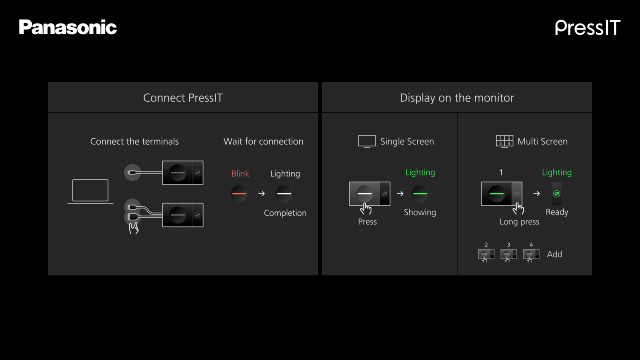
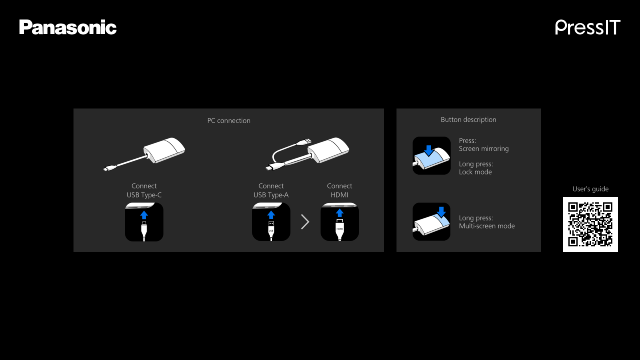
The standby screen differs between WPS2 and WPS1. Please check the images of each standby screen below.
WPS2 Standby Screen
WPS1 Standby Screen
Revision History
-
Model
- PressIT (TY-WPS2, TY-WPSC2, TY-WPB2, TY-WPBC2, TY-WPR2)
Changes from software versions Ver. 1.18563.644 (Receiver) / Ver. 5100a043 (Transmitter)
- Improved stability of video synchronization when HDCP was enabled
- Fixed issue causing extended startup time when manually setting 6GHz wireless channels to the latter range (89ch and above)
- Fixed issue where video might not display correctly after resuming from PC sleep mode
- Other minor fixes and improvements
-
Model
- PressIT (TY-WPS2, TY-WPSC2, TY-WPB2, TY-WPBC2, TY-WPR2)
Changes from software versions Ver. 1.18563.626 (Receiver) / Ver. 5100a036 (Transmitter)
- Improved stability of video synchronization when HDCP was enabled
- Fixed issue causing extended startup time when manually setting 6GHz wireless channels to the latter range (89ch and above)
- Fixed issue where video might not display correctly after resuming from PC sleep mode
- Other minor fixes and improvements
-
Model
- PressIT (TY-WPS2, TY-WPSC2, TY-WPB2, TY-WPBC2, TY-WPR2)
Changes from the Ver. 1.14366.855 (Receiver), Ver. 1.14366.855 (Transmitter: USB/HDMI), Ver. 1.14366.855 (Transmitter: USB-C)
- Compliance with the security requirements of the European Radio Equipment Directive (RED).
- Fixed an issue where the touchpad occasionally became unresponsive when connecting the transmitter.
- Fixed a bug where connecting a WPS2 transmitter to a WPS1 receiver would occasionally display a black screen or cause video delays1.
*After the version update, customers using a WPS1 receiver with a WPS2 transmitter should set the transmitter's MODE switch to 1.
- Other malfunctions have been fixed.
1: Updating the WPS2 transmitter firmware requires a WPS2 receiver.
