

Multi Monitoring & Control Software
This software gives you centralized device control over specific networks in schools, companies, etc., for a maximum of 2,048 devices connected to a LAN network. It serves as a tool for monitoring and control. Please read the user's manual for operating instructions.
Note: To comply with the Radio Equipment Directive (RED) taking effect in the EU from August 2025, firmware and user application versions must be updated for each projector model. Please check the firmware and user application version combinations before and after RED compliance here.
Compatible Display Models
See the List of Compatible Device Models.
Click here for compatible projector models.
* Various restrictions apply depending on the model.
* The Image Distribution function is not supported.
Latest Version
Ver. 5.1 (5.1.6)
Update information from Ver. 4.3 (4.3.10)
- Improvements to Remotely Managed Service integration:
- Improved Local Storage data-saving process (timeout handling)
- Improved information update process (reduced processing load)
- Added automatic recovery when the service terminates abnormally
System Requirements
The computer must meet the following requirements in order to use the supplied software.
| OS | Microsoft®
|
|---|---|
| Software library |
Microsoft .NET Framework 4.8
|
| Web Browser |
Microsoft Edge
|
| CPU |
Intel® Core™ 2 Duo or better, or equivalent processor
|
| Memory | 8,192 MB or higher |
| Hard disk free space |
100 GB or more
|
| Other details |
|
- Note that this does not guarantee that any computer satisfying the above requirements will be able to run the software.
- If you are using a Windows Server 2016 terminal, it is recommended that you operate it as a server. If you wish to use it as a client, please change the security settings of your browser.
Downloading and Installing the Software

MMCS_Ver5.1.6_Setup.zip (149.8 MB)
Preparation
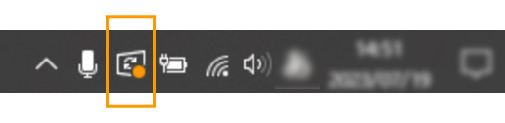
Please check if a Windows update is pending before downloading and installing Multi Monitoring & Control Software. If a Windows update is pending, please update the OS and install Multi Monitoring & Control Software after all updates are complete.
Note: The installation may not proceed normally if a Windows update is pending.
How to Check
Click the Windows Update Status Tray Icon in the taskbar to see if a Windows update is pending. Complete any updates before installing the software.
How to Download and Install
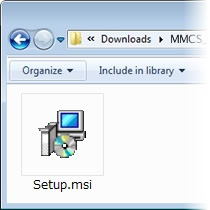
- Click the Download button above and the "Software Licensing Agreement" window will appear.
Select [Agree] and the installer will begin to download automatically. - Once the installer has been downloaded, double click MMCS_Ver5.1.6_Setup.zip.
This will uncompress the setup file and create a folder named License. - Double click the setup icon.
For specific installation instructions, refer to the following manual.
Operating Instructions of Multi Monitoring & Control Software
USB Media Player User Guide
USB_MP_EN.pdf (2.62 MB)
