

Large-Venue1-Chip DLP™ RGB Laser Projector
PT-HTQ20


Note: Brightness measurement, measuring conditions, and method of notation all comply with ISO/IEC 21118:2020 international standards. Value is average of all products when shipped.
Displayed resolution 4K (3840 x 2400 pixels) with Quad Pixel Drive [ON]. Lenses sold separately.
| PT-HTQ20 | |||||
|---|---|---|---|---|---|
| 20,000 lm1 / 20,000 lm (ANSI)2 / 21,000 lm (Center)3 | |||||
| 4K (3840 x 2400 pixels)4 | |||||
Note: Product availability may vary by country or region. |
|||||



 4
4
 5
5 6
6



- 01 Key Feature
-
Immersive Visual Expression
for Diverse EnvironmentsThe PT-HTQ20 combines Rec.2020 color, 20,000 lm1 brightness, and 4K4 resolution to enhance visual realism with exceptional color expression. VIVID PRIME™ technology maintains smooth tonal gradation for Rec.709 content with reduced artifacts for comfortable viewing.
- 02 Key Feature
-
Flexible Installation
with Flagship FeaturesBuilt-in 12G-SDI connectivity, an Intel® SDM standard-compatible SLOT7, Visual Software Suite8 support, and compatibility with existing D3LE-series lenses for 3-Chip DLP™ projectors streamline workflows and reduce TCO for rental companies and owner-operators.
- 03 Key Feature
-
High Reliability for
Demanding ApplicationsEngineered for stable operation, the
PT-HTQ20 combines an IP5X-conformant9 light source and optical engine, mechanical shutter, coated circuit boards10, and fail-safe technologies to deliver low-maintenance, reliable performance in demanding environments.
1 With ET-D3LES250 Zoom Lens attached and when [PICTURE MODE] is set to [DYNAMIC] and [LIGHT POWER] is set to [NORMAL]. Measurement, measuring conditions, and method of notation all comply with ISO/IEC 21118:2020 international standards. Value is average of all products when shipped.
2 With ET-D3LES250 Zoom Lens attached and when [PICTURE MODE] is set to [DYNAMIC] and [LIGHT POWER] is set to [NORMAL]. Measurement, measuring conditions, and method of notation all comply with American National Standards Institute standards. Value is the average of all products when shipped.
3 Average light-output value of all shipped products measured at the center of screen in NORMAL Mode.
4 Displayed resolution 4K (3840 x 2400 pixels) with Quad Pixel Drive [ON].
5 Supports input signals up to 1080p. The display frame rate corresponds to the input signal frame rate.
6 Requires optional TY-SB01DL DIGITAL LINK Terminal Board. YPBPR 4:2:0 format only for 4K/60p signals input via DIGITAL LINK.
7 Optional proprietary and third-party function boards are sold separately. The operation of third-party devices cannot be guaranteed.
8 Visual Software Suite is available free from PASS. Note that the PT-HTQ20 is incompatible with Geometry Manager Pro software. For more information, click here.
9 Conforms to the IP5X Dust Protected (IEC 60529) standard. The Dust Protected performance of this unit is not guaranteed to be free from damage or failure under all conditions (environments with conductive dust, etc.). Please use an enclosure in environments with smoke containing oil, salt, and moisture.
10 Coating applied to selected circuit boards only.
Immersive Visual Expression for Diverse Environments

Unlock a World of Vivid Color

Wide-Gamut Color Supporting Rec.2020
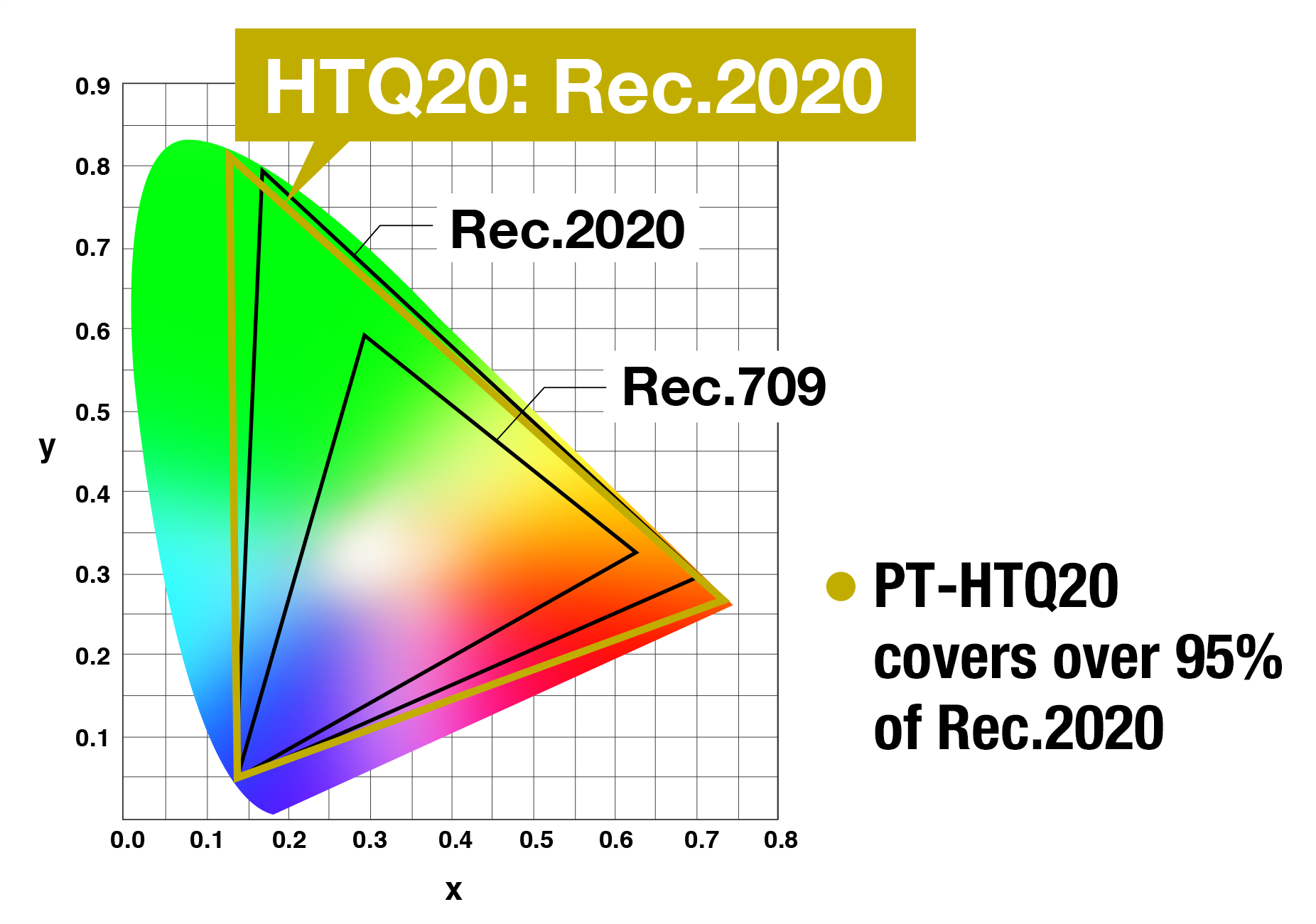
VIVID PRIME™ supports the Rec.2020 color gamut for more vivid, lifelike images. For Rec.709 content, it delivers 3-Chip DLP™-
equivalent color brightness with smoother tonal gradation. Rec.709 content can also be projected in Rec.2020 mode for enhanced color expression on colored projection surfaces or in bright environments.
Color-Wheelless Design Reduces Rainbow Effect
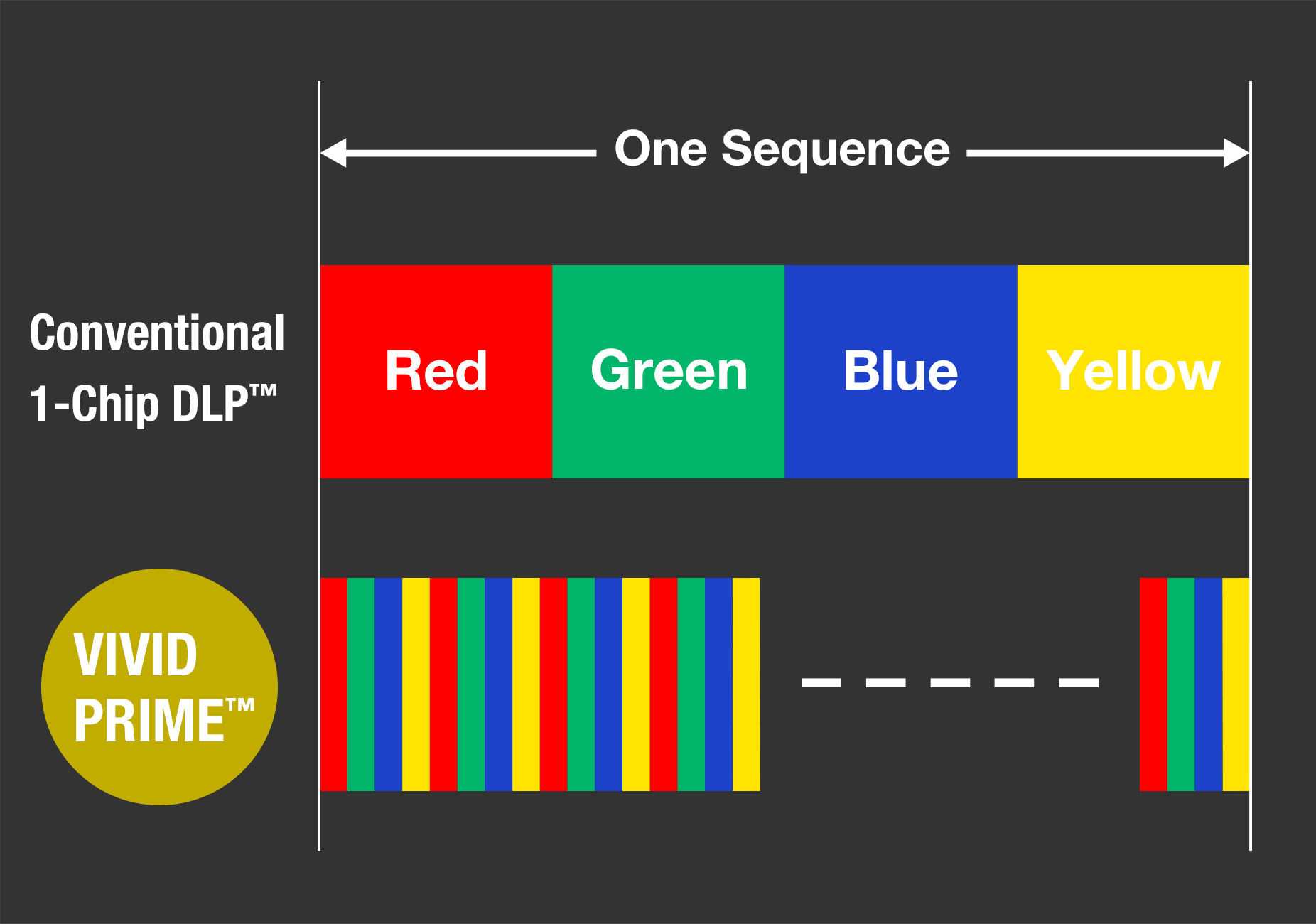
Built on integrated RGB laser phosphor technology, VIVID PRIME™ combines
high-speed color switching—more than five times faster than conventional color-wheel systems—with optimized DMD sequencing
to produce smooth, clear images while significantly reducing rainbow effect for a natural, comfortable viewing experience.
Optimized Picture Modes for Diverse Applications
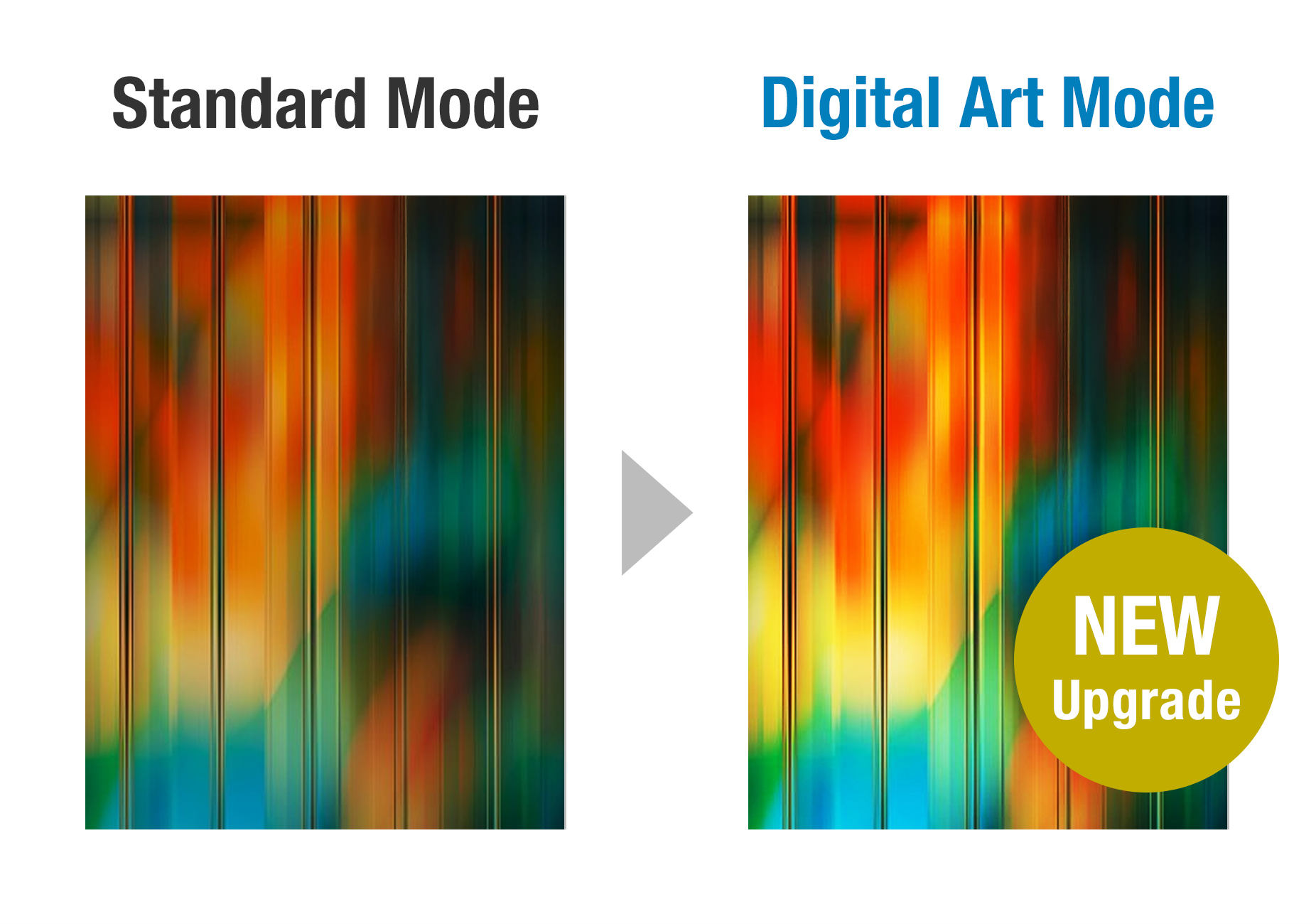
Dedicated picture modes optimize image reproduction for different source formats, content, and production environments, including NATURAL, CINEMA, REC709, REC2020, and the new DIGITAL ART mode supporting DCI-P3 color reproduction for immersive art experiences.
Smooth 4K Images with Quad Pixel Drive

Refined and improved over three generations of development, Quad Pixel Drive enhances perceived 4K image detail by applying high-speed pixel shifting in both the vertical and horizontal directions. Combined with 240 Hz signal processing, the system divides each frame into sub-frames and precisely aligns them on screen to create a denser, smoother image with reduced visible pixel structure. The result is exceptionally smooth, detailed 4K images, even at close viewing distances.
Note: Displayed resolution 4K (3840 x 2400 pixels) with QUAD PIXEL DRIVE: [ON].
Supports High-Speed 240 Hz Video
The PT-HTQ20 supports 1080p/240 Hz video playback for smooth reproduction of fast motion with minimal blur with input-to-output latency of less than 6 ms. High-speed content can be displayed across multiple screens with edge blending enabled, ideal for eSports and other applications where fluid, low-latency motion reproduction is important.
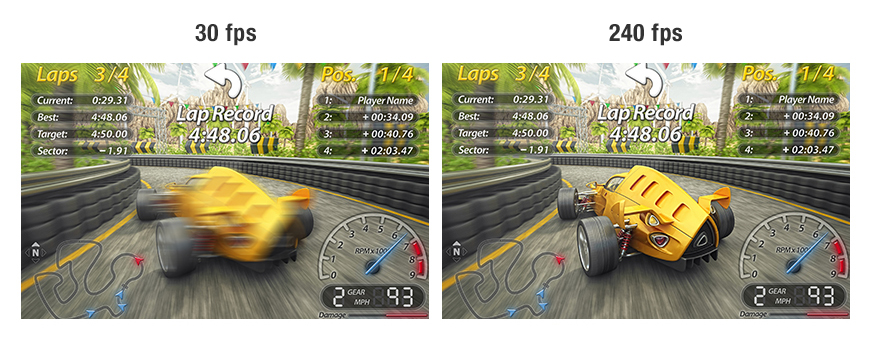
Note: Image for illustration only. Supports input signals up to 1080p. The display frame rate corresponds to the input signal frame rate. Latency depends on the input signal, the peripheral devices used, and other factors.
Improved 25,000:1 Dynamic Contrast Technology
Dynamic Contrast technology has been enhanced to achieve a 25,000:1 contrast ratio. Advanced scene analysis enables more precise recognition of light and dark areas, improving overall contrast expression. The system analyzes content frame by frame and dynamically adjusts light output to match the requirements of each scene.
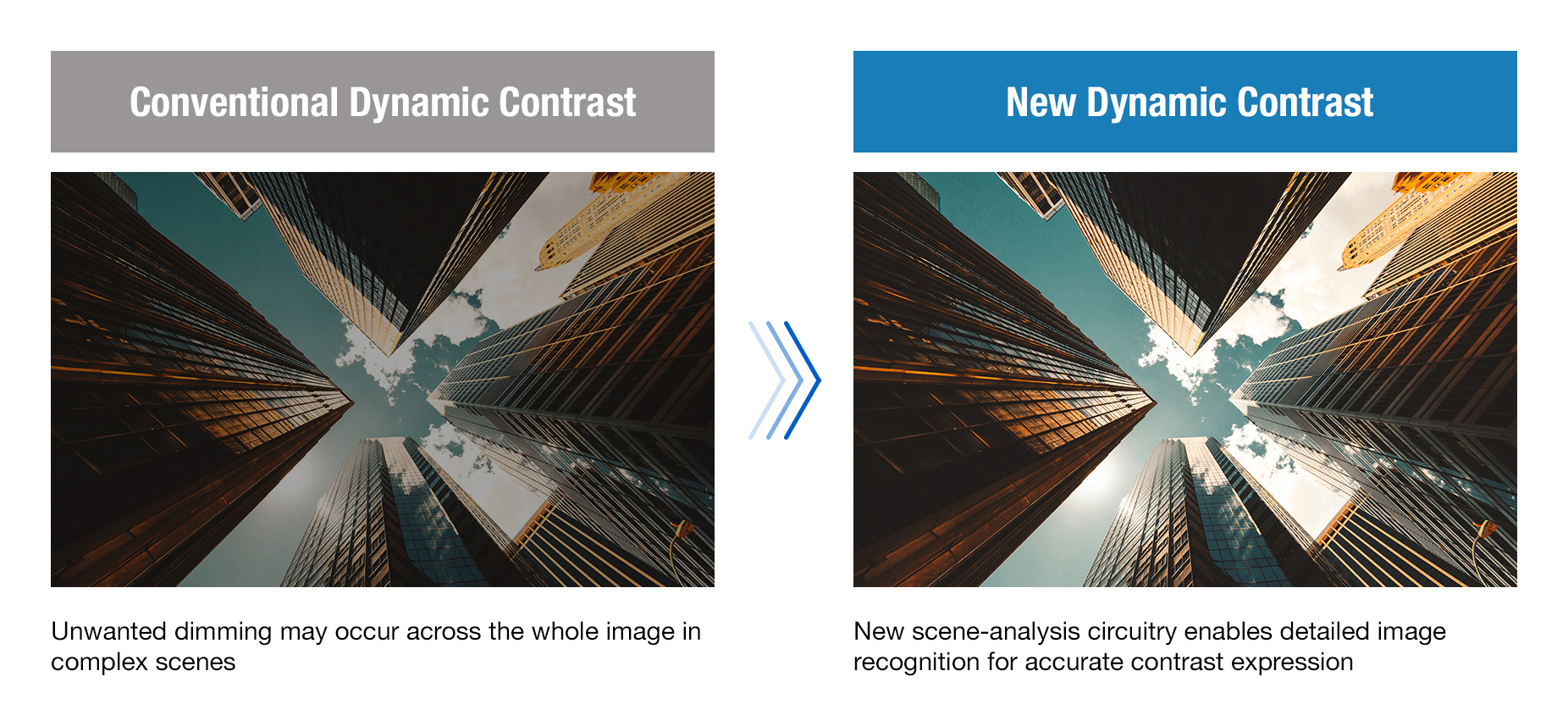
Note: Contrast ratio measured Full On/Full Off with Dynamic Contrast [3]. Measurement, measuring conditions, and method of notation all comply with ISO/IEC 21118:2020 international standards. Value is the average of all products when shipped.
Gradation Smoother 2 – Precise and Powerful Control
Gradation Smoother 2 reduces banding noise in color gradients. The updated system expands adjustment from three to six correction levels, enabling finer control and more effective suppression of noise in challenging material. Users can select the appropriate level via the remote or disable the function when not required, minimizing the need for content re-editing.
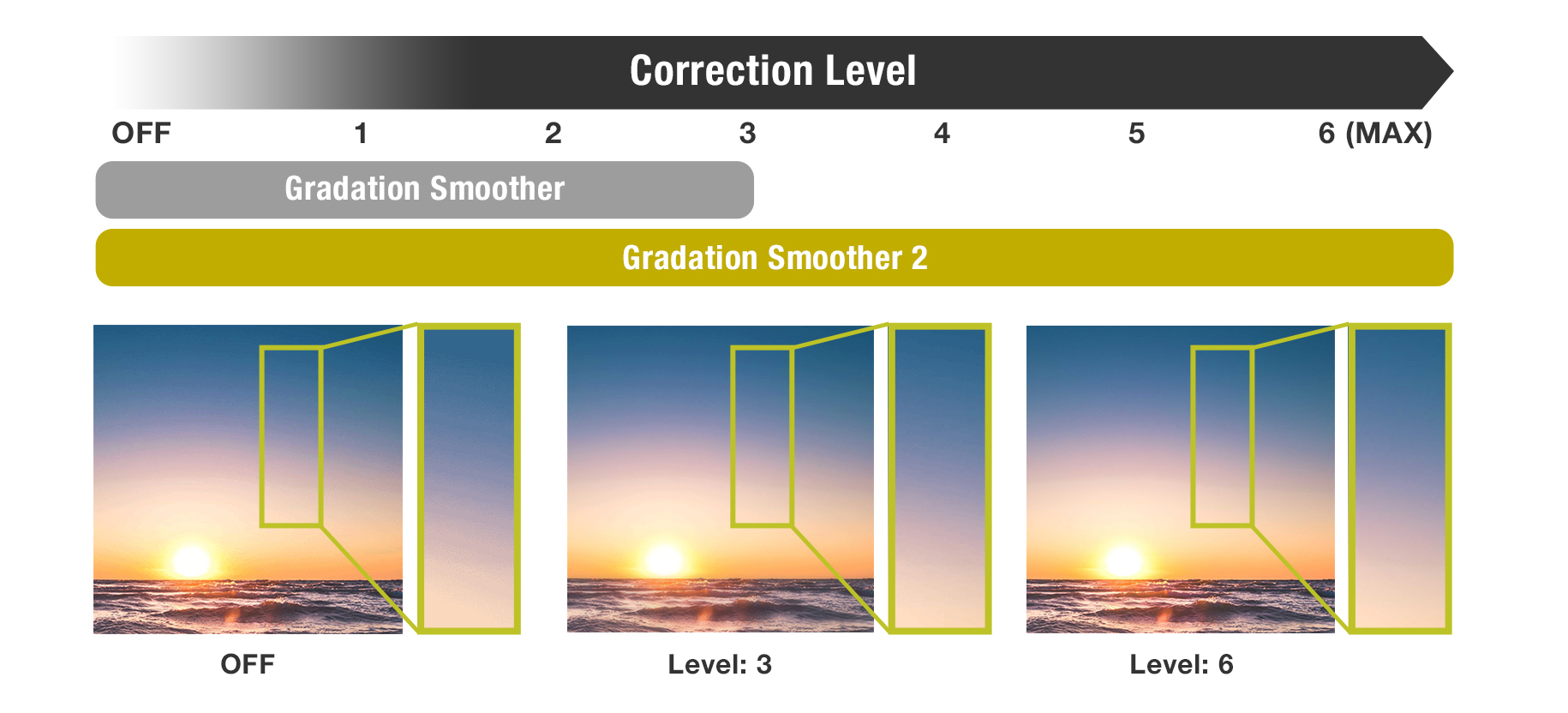
Note: Projectors ship with Gradation Smoother 2 set to a factory default of [2].
Flexible Installation with Flagship Features
Compatible with D3LE-Series Lenses for Panasonic 3-Chip DLP™ Projectors
The PT-HTQ20 is compatible with current-generation D3LE-series lenses used with most Panasonic 3-Chip DLP™ projectors, helping to maximize asset utilization and reduce the total cost of ownership. High-quality optics with Lens ID, Lens Memory, and Active Focus Optimizer (AFO) functions ensure precise setup and optimal image performance.
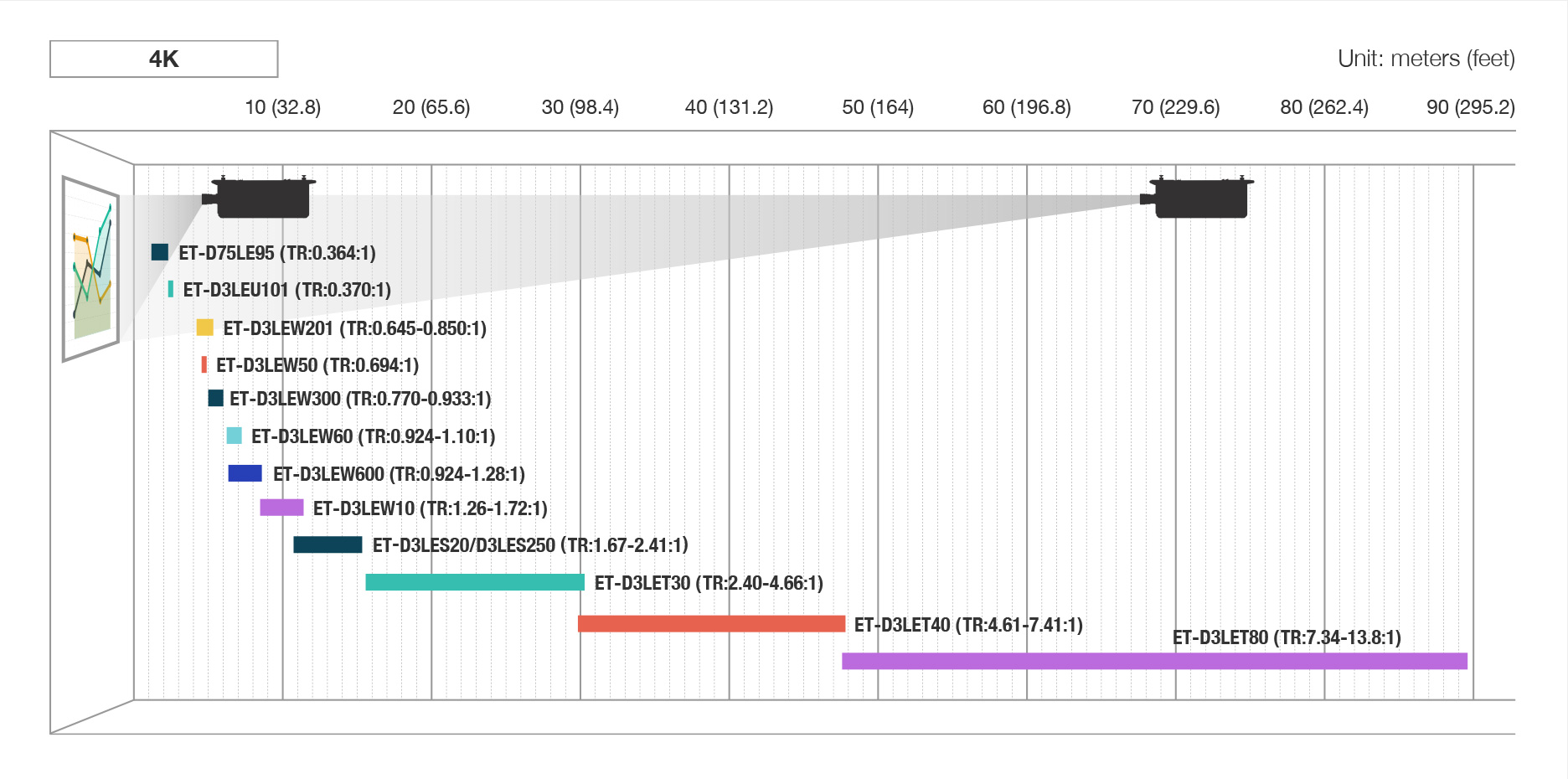
Note: Throw distances listed are for a 300-inch (16:10) image. The ET-D75LE95 ultra-short-throw lens is also supported. Lens ID, Lens Memory, and AFO are not available with some lenses. Visit our Lens Guide webpage for more information.
Efficient Logistics and Shared Compatibility
With compact body dimensions similar to the PT-RQ25K Series, the
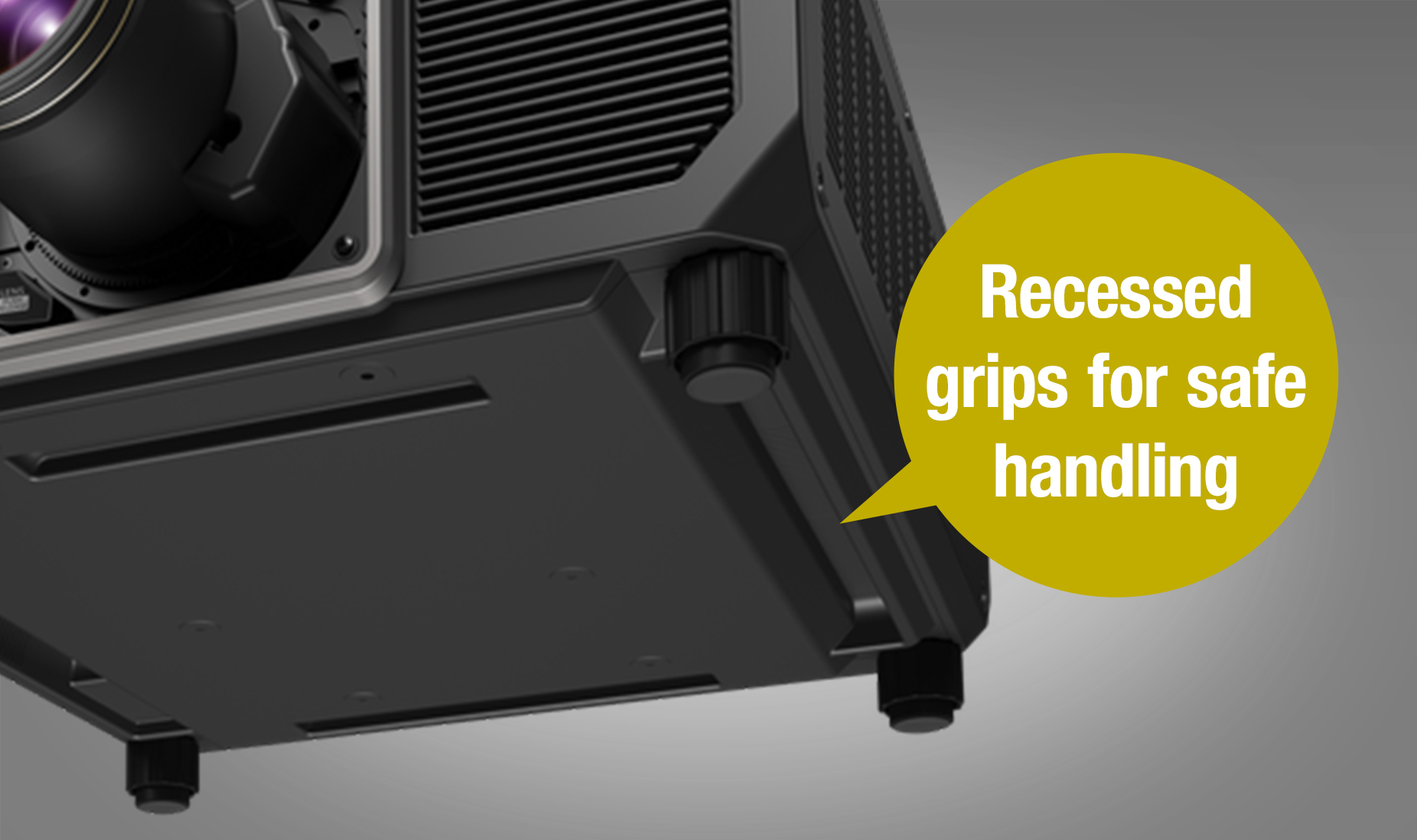
PT-HTQ20 can be carried by a crew of two, easing transport, storage, and deployment demands. Recessed side grips improve handling, while compatibility with existing PT-RQ25K Series frames, flight cases, and D3LE-series lenses helps streamline fleet upgrades and maximize return on existing assets.
Note: Some legacy lenses compatible with the PT-RQ25K Series are incompatible with the PT-HTQ20. See the optional accessories section or visit our Lens Guide webpage for more information.
Operates on AC 100–120 V for Setup
The PT-HTQ20 supports both AC 200–240 V power for full-brightness projection and AC 100–120 V for setup and calibration. Complete setup and image calibration using power from the consumer grid and avoid delays while high-voltage power is rolled out on site.
Note: The maximum light output value is limited to less than 20,000 lm when using the projector with AC 100–120 V. However, the maximum value of light output is further decreased in following cases: When the projector is used with a voltage lower than AC 120 V; when ambient temperature exceeds 25 °C (77 °F); when a function board is installed in the slot; when an external device is connected to the <USB (DC OUT)> terminal; when the light source has deteriorated from use; or when there is dust on the optical parts.
12G-SDI Input and Intel® SDM Standard-Compatible Slot
The PT-HTQ20 equips a 12G-SDI input as standard, enabling stable transmission of high-bandwidth, high-resolution video content over long distances. An Intel® SDM standard-compatible SLOT integrates optional third-party or proprietary function boards such as our ET-SBFMP10 Media Processor, which simplifies complex multi-projector systems and reduces setup time for projection mapping and other large-scale installations.
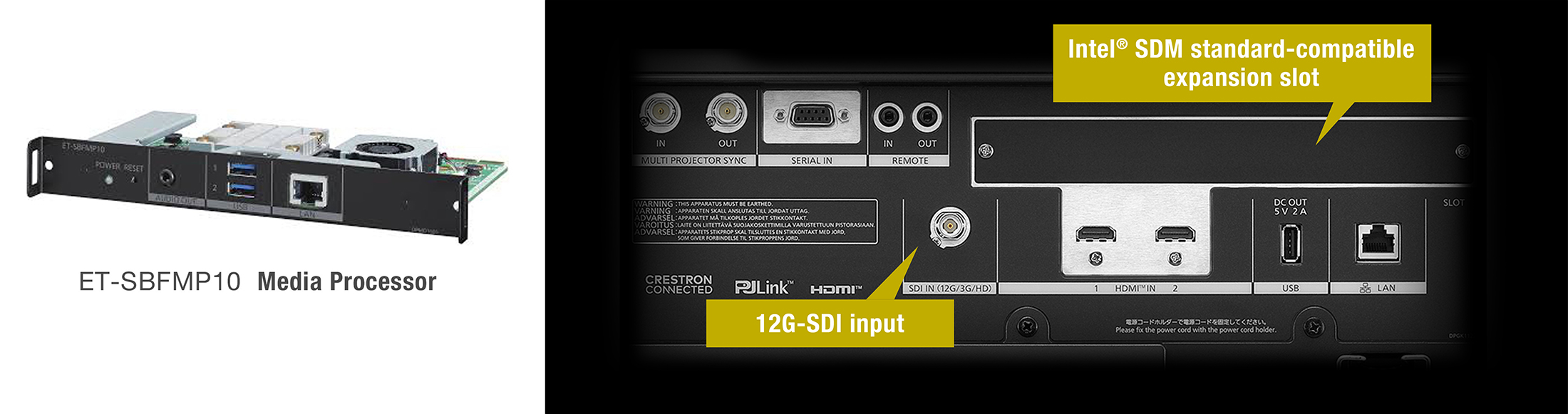
Note: Optional proprietary and third-party function boards are sold separately. The operation of third-party devices cannot be guaranteed.
Flexible Black-Level Adjustment for Curved Screens
Black-level adjustment on curved and irregular screens is now more precise. Up to 33 adjustable control points—the highest number on any Panasonic projector to date—allow black-level adjustment boundaries to be reshaped to follow warped blend edges, enabling accurate black-level matching across blended areas for more seamless multi-screen images.
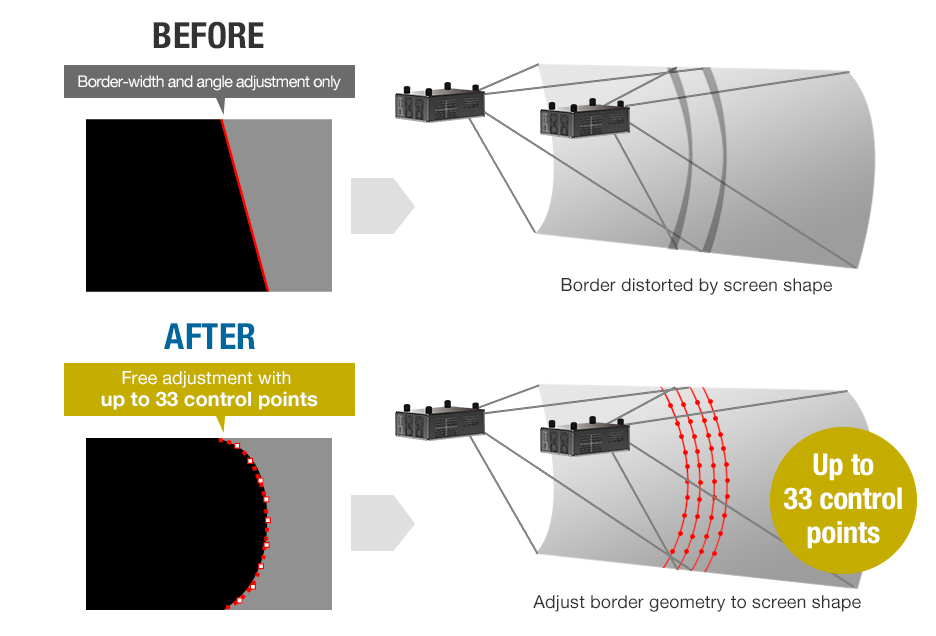
Improved Black-Level Uniformity Beyond the Display Area
Independent black-level and geometric adjustment helps reduce black-level bumps beyond the display area. Black-level correction can be applied across the entire blend, including image overlaps beyond the display area, for smoother black-level transitions across blended images.
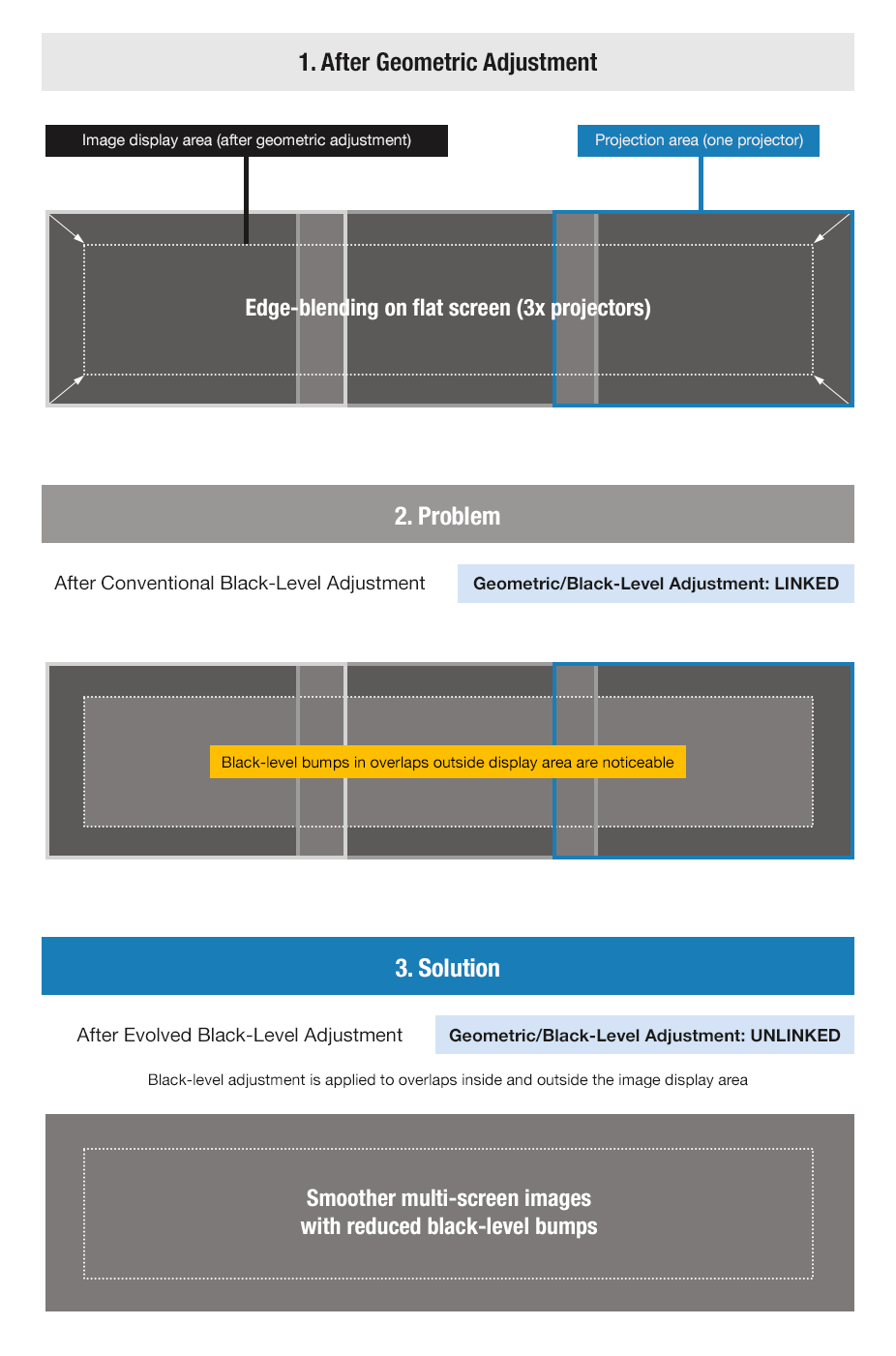
Note: Black-level area setting must be performed before black-level adjustment. The ability to unlink black-level adjustment from geometric adjustment is supported only on flat screens when adjacent images are aligned vertically or horizontally.
Compatible with Visual Software Suite (VSS)
Visual Software Suite is a free, Windows®-based platform that combines multiple functions into one intuitive graphical interface, enabling swift and efficient setup and onsite adjustments. Integrating and enhancing the capabilities of previously separate Panasonic software, it transforms your workflow into streamlined and cost-effective processes. For more information, please visit the VSS webpage.

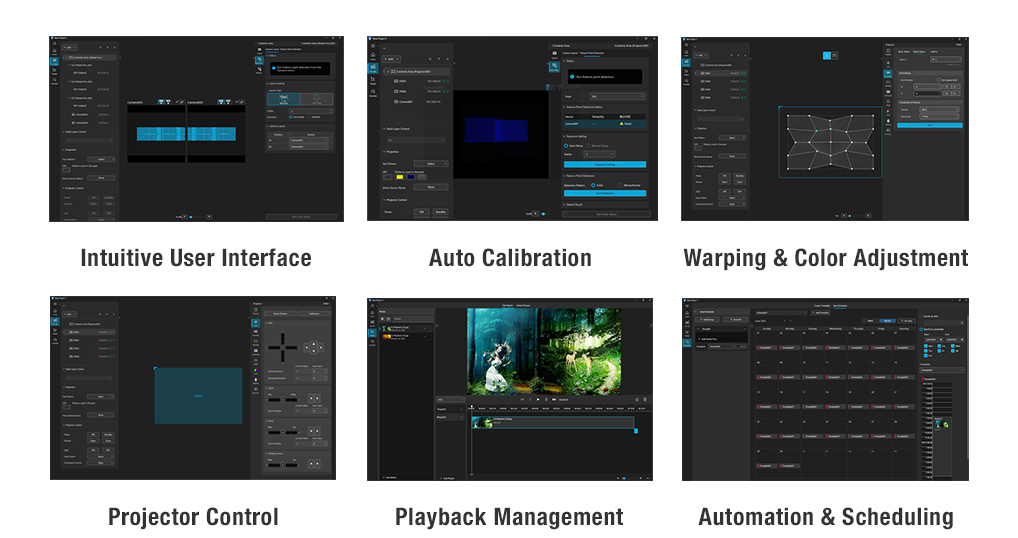
Note: Some described functions require use with an optional ET-FMP50 Series media processor and camera(s) (sold separately). Compatible cameras comprise NIKON D5200/D5300/D5500/D5600/D7500/Z50/Z5 and the IDS GV-5890CP-C-HQ. Note that the PT-HTQ20 is incompatible with Geometry Manager Pro software. Please visit PASS for more information.
Automatic Black-Level Matching with VSS
Visual Software Suite automatically matches black levels in overlapping areas of edge-blended horizontal and vertical images using an optional IDS or compatible Nikon camera, creating more seamless, uniform multi-screen images.
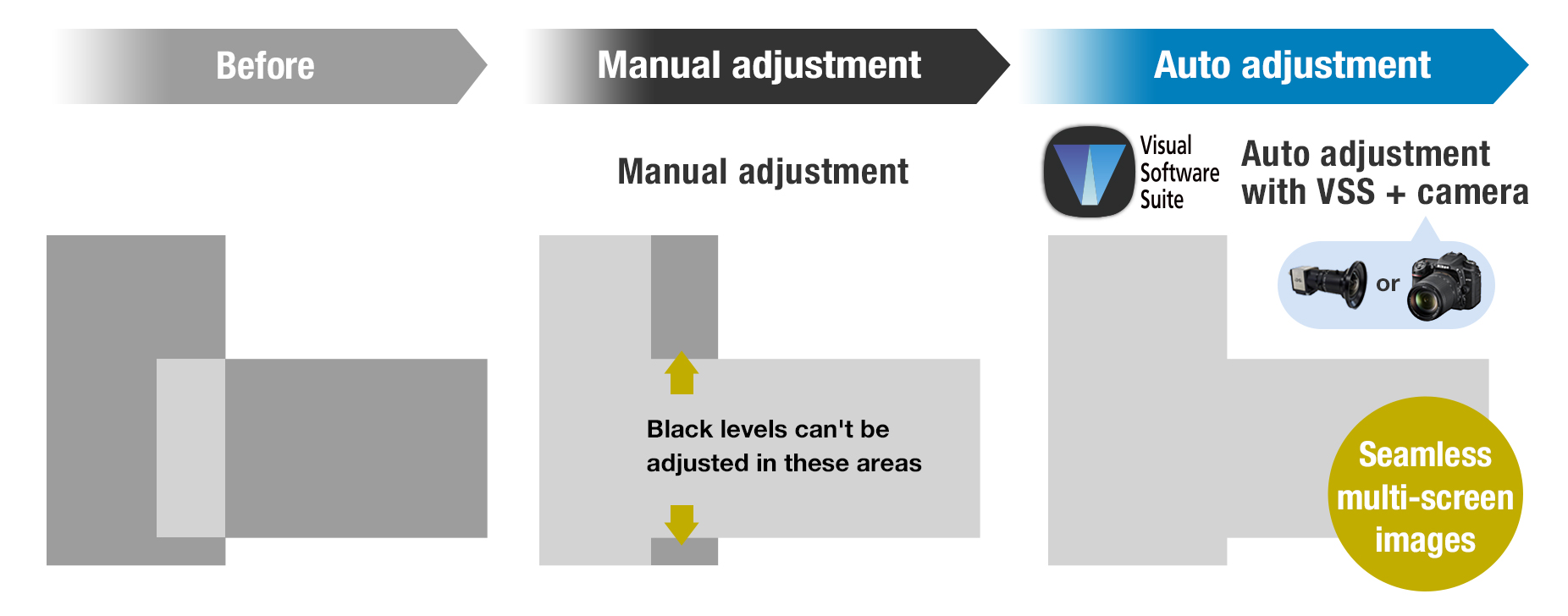
Note: Compatible cameras (sold separately) comprise NIKON D5200/D5300/D5500/D5600/D7500/Z50/Z5 and the IDS GV-5890CP-C-HQ. Please visit PASS for more information.
Optional Media Processors to Simplify Multi-Projection
The PT-HTQ20 works with Panasonic’s optional ET-FMP50 Series media processors to simplify multi-projection complexity. The processors, which comprise box-type and function board-type for the projector's Intel® SDM standard-compatible SLOT, feature automatic warping/blending and media playback capabilities. For more information, please click here.
Note: Some described functions require use with a compatible camera(s). Compatible cameras (sold separately) comprise NIKON D5200/D5300/D5500/D5600/D7500/Z50/Z5 and the IDS GV-5890CP-C-HQ. Please visit PASS for more information.
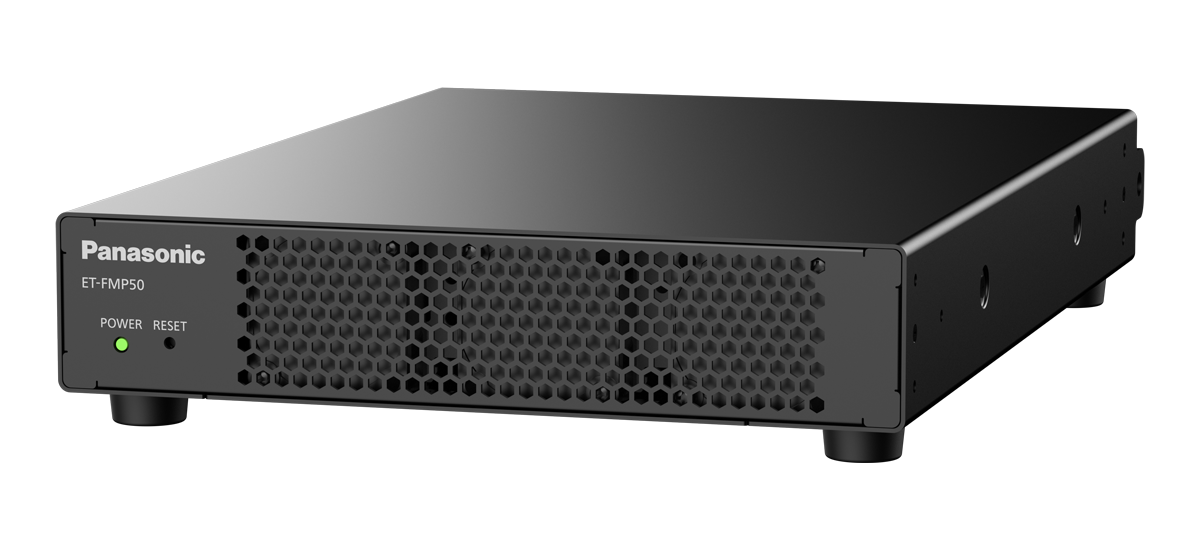
Check Settings and Status with Information Monitor
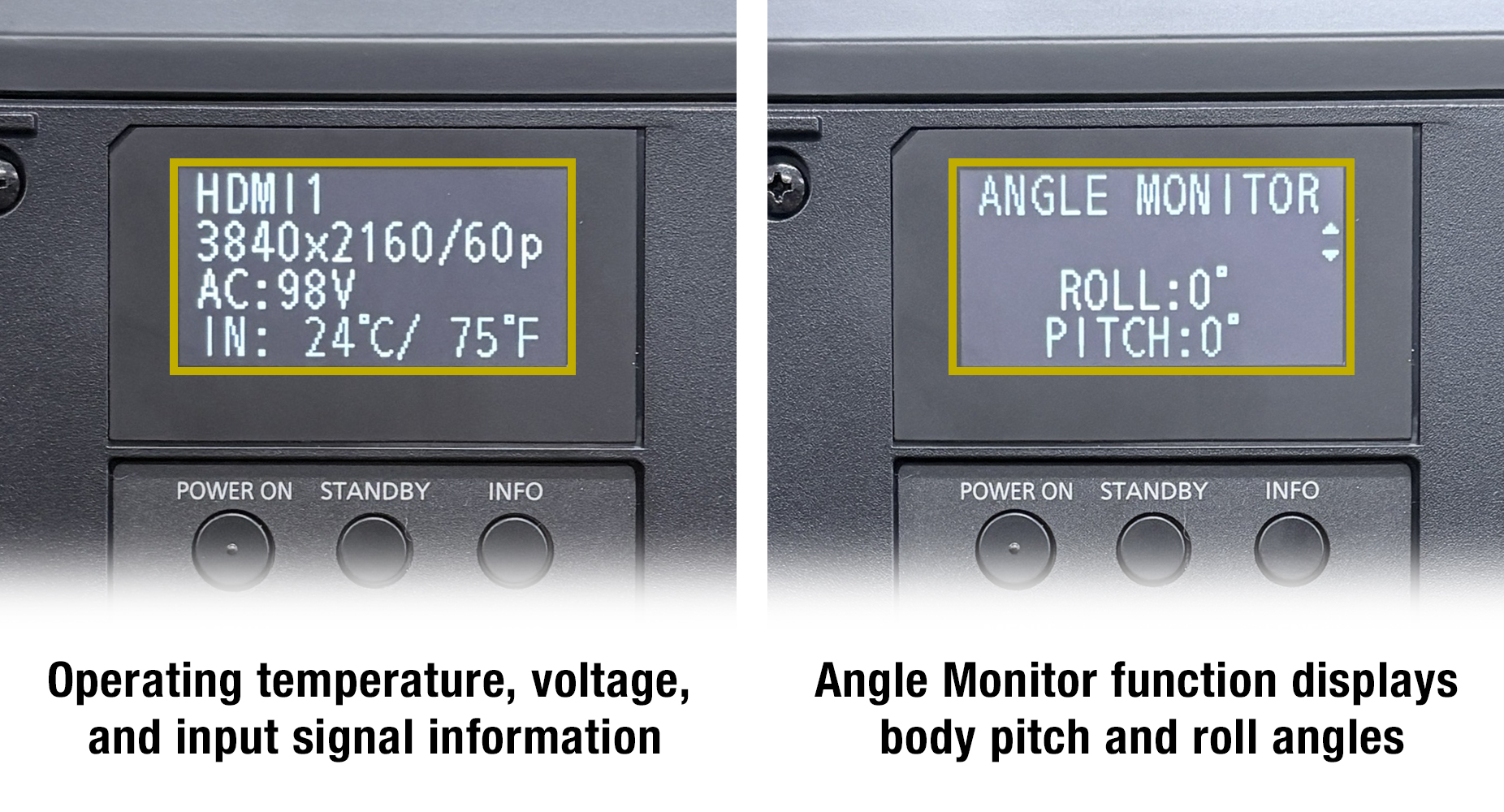
A 2.4-inch OLED Information Monitor displays real-time operating status, including temperature, voltage, runtime, input signal, error codes, and projector posture with the newly added Angle Monitor function. Use the keypad to configure network settings, check system status, or update firmware while the projector is in standby, eliminating the need to project the OSD and streamlining setup and maintenance.
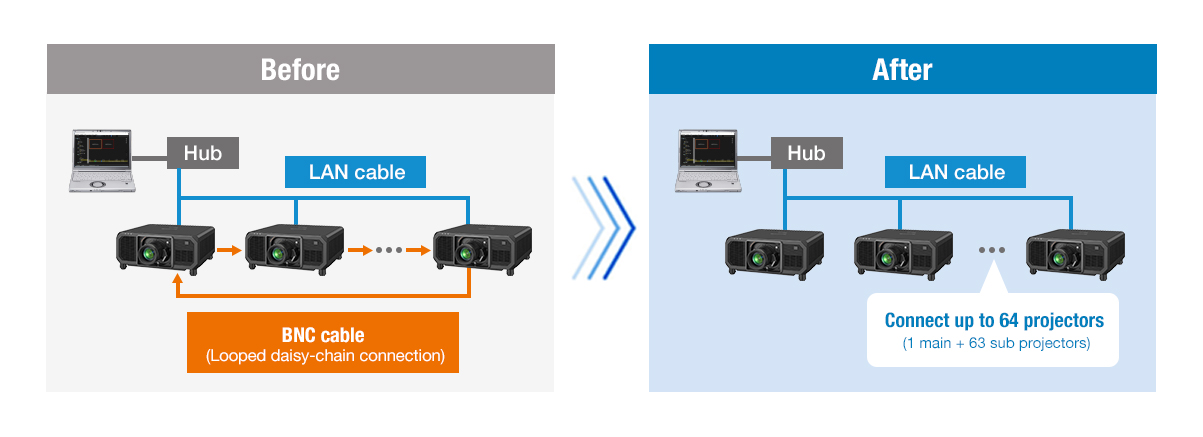
Contrast Sync and Shutter Sync via LAN
Enhanced multi-projector contrast and shutter sync is now supported over LAN only or, if preferred, conventional daisy-chain BNC connections. Reduce cabling requirements, lower system costs, and simplify installation without compromising on performance.
Smart Projector Control App Integration
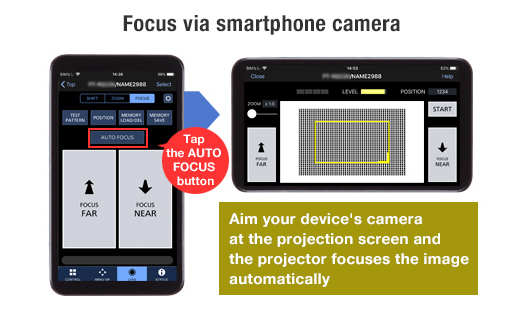
Smart Projector Control app enables the control and adjustment of up to 64 projectors from a smartphone or tablet over wireless LAN. Access the projector menu via the Web Control UI and manage key functions including test pattern selection, lens setup, shift, zoom, and focus via the device camera, as well as shutter operation, brightness locking, and status monitoring. For details, visit the Smart Projector Control webpage.
Note: Available free from the App Store or the Google Play store. Some mobiles do not support the focusing function via the device camera.
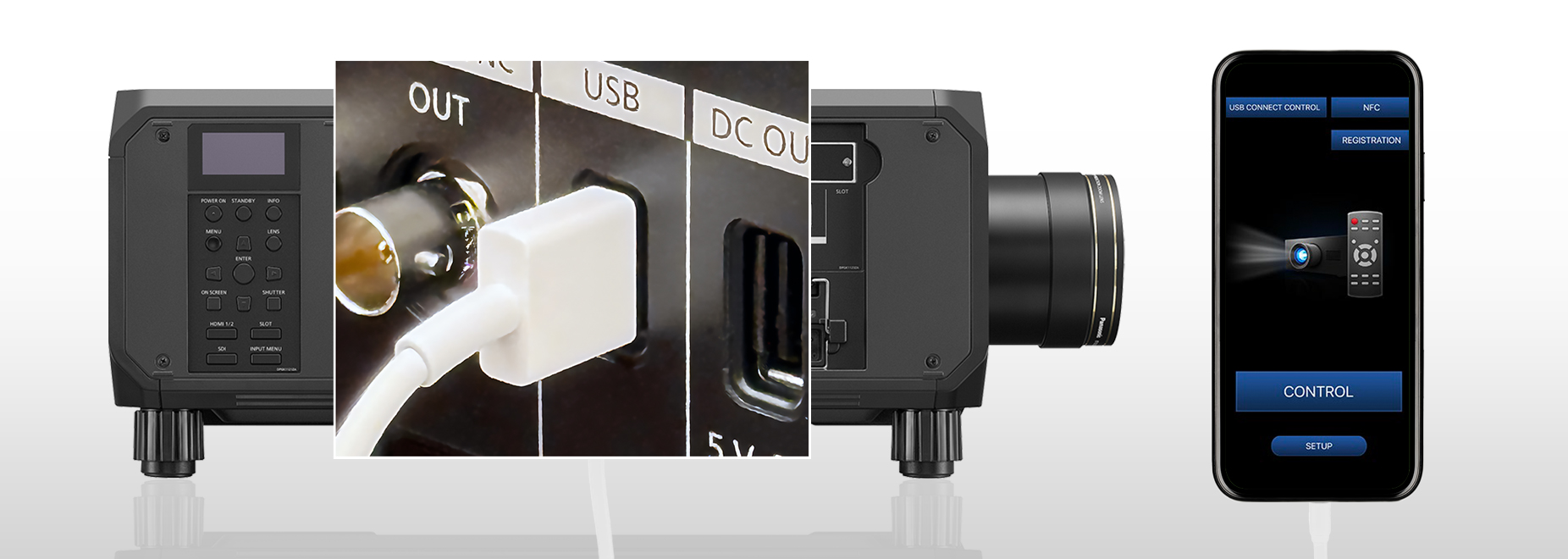
USB Control Connect: App Control Without Wireless LAN
Avoid delays during projector setup when network infrastructure is not yet available on site. USB Control Connect enables use of the Smart Projector Control app via a USB connection, allowing installers to perform screen adjustments and configure settings directly from their mobile device. Improve setup efficiency and keep your project on schedule.
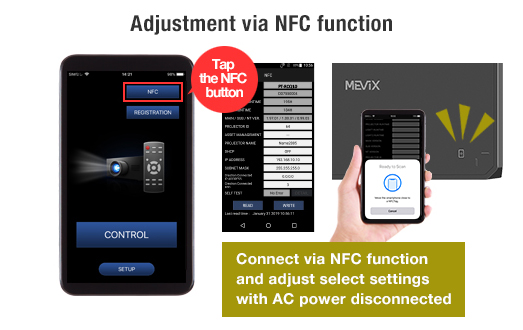
NFC Function: Prep Without AC Power
Prepare your projectors before power is available on site and reset them after use without on-screen menu projection. Using the Smart Projector Control app and NFC, installers can assign projector IDs, set IP addresses, and prepare units for network connection while unplugged. After the event, settings can be initialized to factory defaults prior to crating, streamlining teardown and ensuring projectors are ready for the next deployment.
Note: Projectors sold in some countries or regions require an ET-NUK10 Upgrade Kit from PASS to activate the NFC function. See the NFC Regional Compatibility List for details.
Pre-Show Video Checks with Remote Preview
Remote Preview allows projectionists to verify input signals via video thumbnails before projection. Accessible via Multi Monitoring & Control Software or web browser, it works in Standby or with the mechanical shutter activated, helping identify issues in advance and reduce on-site errors when screen access is limited.
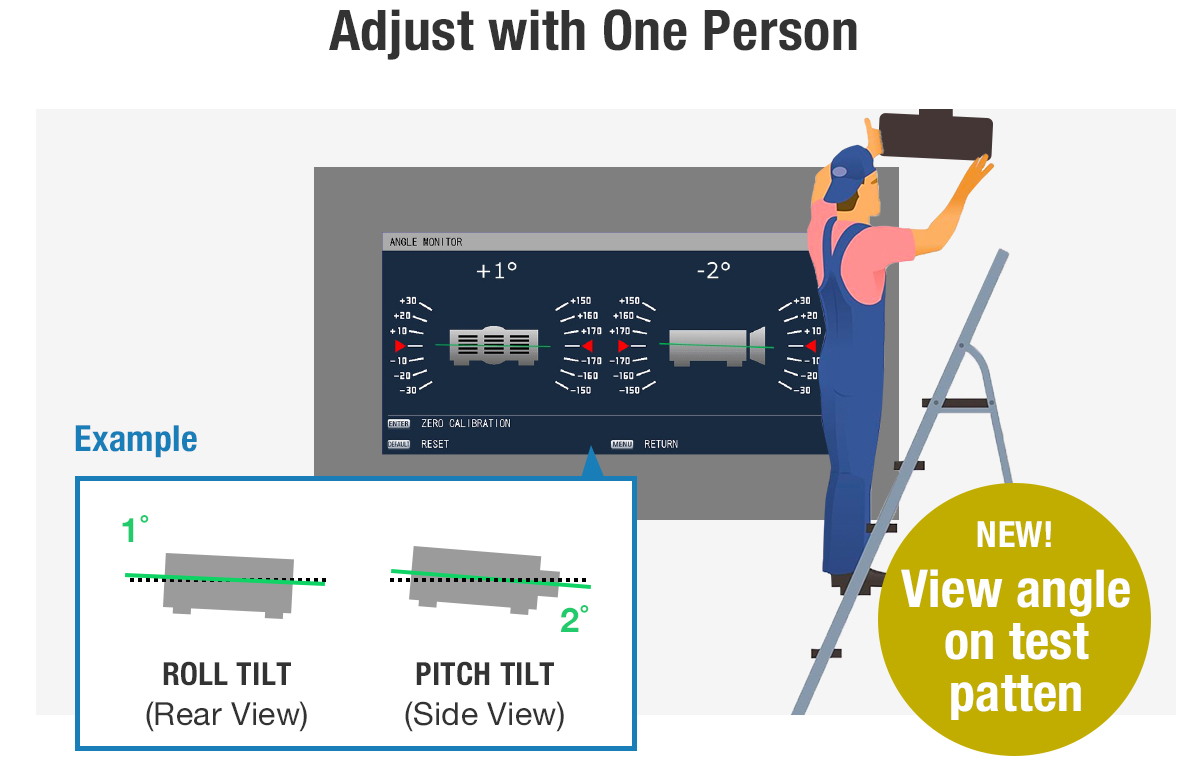
Angle Monitor for Convenient, Resource-Friendly Adjustment
The PT-HTQ20 features a built-in sensor that detects changes in the projector’s pitch and roll angles, which can be displayed in the settings menu, over a test pattern, or via the projector’s Information Monitor display. A single technician can view the information and adjust the projection angle without needing assistance from another team member.
Note: The displayed values are based on the results of angle sensor detection and may differ from the actual projection angle. They are for reference only, and accuracy is not guaranteed.
High Reliability for Demanding Applications
Coated Circuit Boards for Enhanced Durability
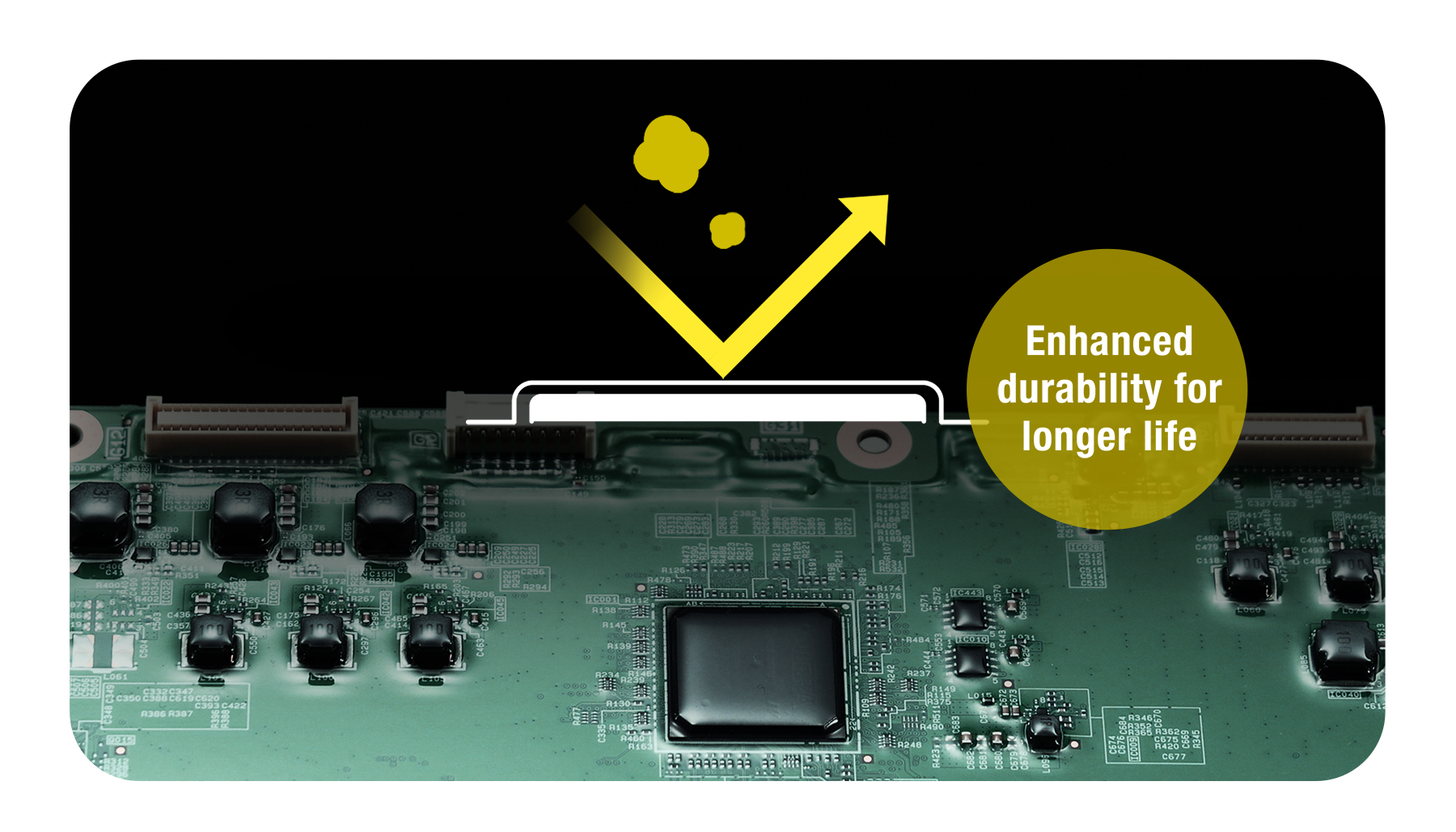
Selected circuit boards are treated with a proprietary coating that helps suppress corrosion caused by moisture and dust. This added layer of protection improves reliability in harsh environments. By reducing the impact of environmental factors on key components, the design supports stable, long-term operation in demanding conditions.
Note: Outdoor installation is not possible. Use of an enclosure is recommended in environments containing smoke, salt, oil, conductive dust, moisture, and other airborne contaminants.
Built-In Mechanical Shutter
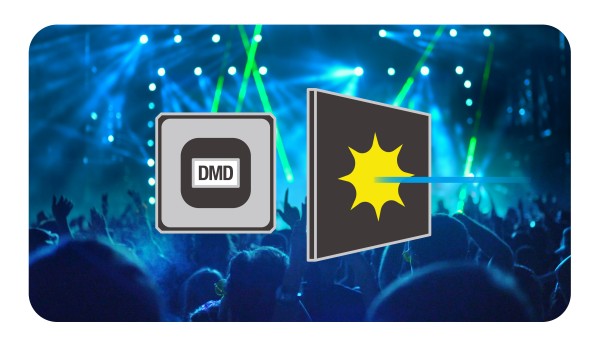
The PT-HTQ20 features an internal mechanical shutter. Designed for live event environments where laser lighting is often used, the shutter helps protect the DMD chip by blocking stray laser beams that may enter through the projection lens, reinforcing reliability in demanding
production settings.
Low-Maintenance, Dust-Resistant Design
The PT-HTQ20’s optical engine and laser light source conform to the IP5X Dust Protected (IEC 60529) standard, eliminating the need for an air filter and reducing maintenance requirements. Sealed liquid-cooling system and refined airflow path help stabilize performance in demanding conditions. Reliability is proven through accelerated dust testing based on in-house standards, simulating environments with high levels of airborne particulates.
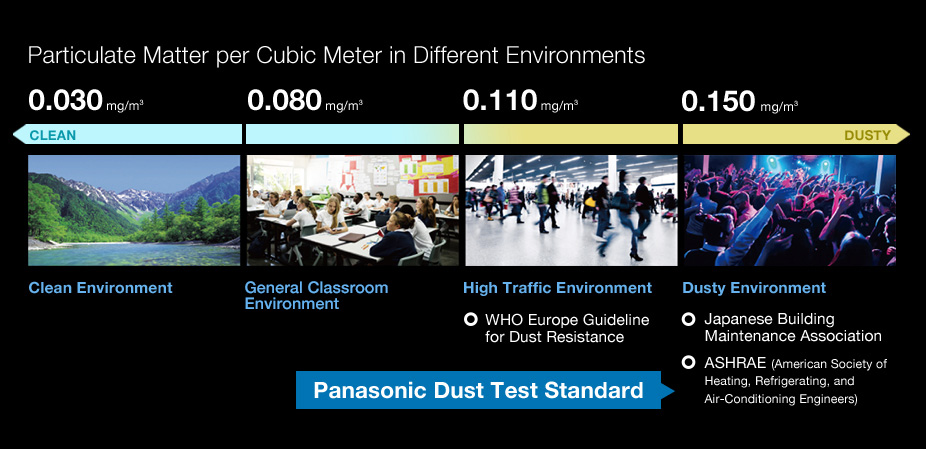
Note: The Dust Protected performance of this unit is not guaranteed to be free from damage or failure under all conditions (environments with conductive dust, etc.). Please use an enclosure in environments with smoke containing oil, salt, and moisture.
Backup Input for Reliable Signal Redundancy
Backup Input mode safeguards projection by enabling automatic failover between two identical signals. When the source outputs the same content to designated primary and backup inputs—either HDMI™ or SDI—the projector instantly switches to the backup if the main signal is lost, with no screen blanking. This reduces the chance of image display interruption and provides greater peace of mind in mission-critical environments.
Note: The combination of primary and backup terminal assignments is fixed and input signals must be identical. Backup Input mode for SDI requires an optional TY-SB01QS 12G-SDI Terminal Board.
Failover Circuitry Minimizes Interruptions
Multiple laser modules incorporate unique Failover Circuitry. If a single diode fails, only the affected series is bypassed rather than the entire module, as with some conventional designs. Projection continues uninterrupted with minimal loss of brightness, providing an added layer of reliability where continuous image display is critical.
Reduced Operating Noise
To reduce the chance of distraction and maintain audience immersion in quiet production environments, operating noise in NORMAL/ECO mode is limited to just 42 dB—significantly lower than PT-RQ25K Series in the same operating mode.
Additional Features
- ・ Supports Crestron Connected™ V2, Crestron XiO Cloud™, Art-Net DMX, AMX® DD, PJLink™, IPv61 and Web API
- ・ Data-cloning function via LAN or USB2
- ・ 1 USB port for data communication and DC 5 V/2 A power supply
- ・ Compatible with the Multiple PJ Firmware Batch Update Tool
- ・ HDMI™ Auto Equalization Function
- ・ Updated Web UI interface and screen marker tools
- ・ Multi-screen Support System
- ・ Multi-Unit Brightness and Color Control
- ・ Waveform Monitor Function
- ・ Free 360-degree installation
1 Optional AJ-WM50 Series Wireless Module is not compatible with IPv6.
2 Data-cloning is supported among identical models with the same resolution. Excludes passwords, projector ID, and network settings.