

PortableLCD Projectors
PT-VMQ85 SeriesPT-VMQ85 / PT-VMQ75 / PT-VMQ65
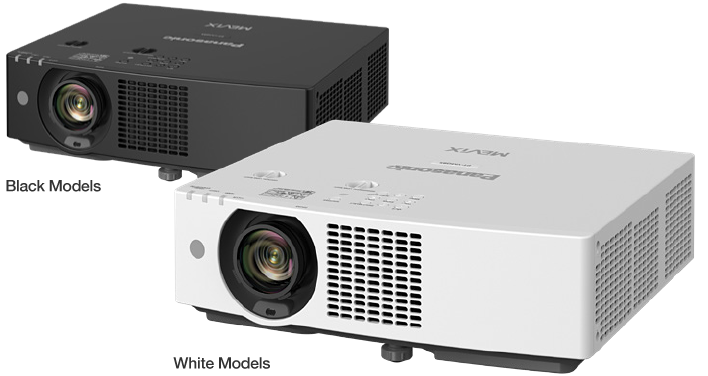
Note: As of June 2026, based on internal research, the PT-VMQ85 is the smallest and lightest 4K LCD projector with over 8,000 lm, and the PT-VMQ75 is the smallest and lightest with over 7,300 lm. Displayed resolution 4K (3840 x 2400 pixels) with Quad Pixel Drive [ON].
| PT-VMQ85 | PT-VMQ75 | PT-VMQ65 |
|---|---|---|
| 8,000 lm1 / 8,000 lm (ANSI)2 / 8,400 lm (Center)3 |
7,300 lm1 / 7,300 lm (ANSI)2 / 7,600 lm (Center)3 |
6,500 lm1 / 6,500 lm (ANSI)2 / 6,800 lm (Center)3 |
| 4K (3840 x 2400 pixels)4 | ||
Note: Product availability varies by country or region. |
||

 4
4
 5
5
 6
6- 01 Key Feature
-
Bright, High-Contrast
Detail in Any SpacePanasonic’s first 4K4 LCD projector delivers sharp, crisp detail from the smallest, lightest body in its class7. Quad Pixel Drive 2-axis pixel-shifting technology and up to 8,000 lm1 ensure clear visuals in well-lit spaces, with precise reproduction for diverse applications.
- 02 Key Feature
-
Easy to Handle with Flexible Installation
Compact and lightweight, the series simplifies transport, installation, and adjustment. 1.6x zoom, wide lens shift, and Angle Monitor offer flexible, single-person setup, while 4K DIGITAL LINK5 and dual HDMI™ inputs support efficient integration and widescreen video formats.
- 03 Key Feature
-
Energy-Efficient,
Eco-Conscious DesignHigh-brightness imaging is paired with excellent efficiency. Image Detection8 reduces consumption when content is inactive, while recycled materials and recyclable packaging lower environmental impact for more sustainable projection.
1 Measured when [PICTURE MODE] is set to [DYNAMIC], [LIGHT POWER] is set to [NORMAL], [DAYLIGHT VIEW] is set to [OFF], and [AUTO POWER SAVE] is set to [OFF]. Measurement, measuring conditions, and notation method comply with ISO/IEC 21118: 2020 international standards. Value is the average of all products when shipped.
2 Measured when [PICTURE MODE] is set to [DYNAMIC], [LIGHT POWER] is set to [NORMAL], [DAYLIGHT VIEW] is set to [OFF], and [AUTO POWER SAVE] is set to [OFF]. Measurement, measuring conditions, and method of notation all comply with American National Standards Institute standards. Value is the average of all products when shipped.
3 Average light-output value of all shipped products measured at the center of the screen in NORMAL Mode.
4 Displayed resolution 4K (3840 x 2400 pixels) with Quad Pixel Drive [ON].
5 YPBPR 4:2:0 format only for 4K/60p signals input via DIGITAL LINK.
6 Requires the AJ-WM50 Series Wireless Module (sold separately). Availability may vary by country or region.
7 As of June 2026, based on internal research, the PT-VMQ85 is the smallest and lightest 4K LCD projector with over 8,000 lm, and the PT-VMQ75 is the smallest and lightest with over 7,300 lm.
8 Settings cannot be made when [PICTURE] menu → [DAYLIGHT VIEW] is set to [AUTO], [DYNAMIC CONTRAST] is set to anything other than [OFF], [ECO MANAGEMENT] →
[AUTO POWER SAVE] is set to [OFF], [ECO MANAGEMENT] → [LIGHT POWER] is set to anything other than [NORMAL], a [TEST PATTERN] is displayed, or there is no signal. Image Detection function is supported when the input signal is transmitted via HDMI™ terminal.
Making Immersive 4K Visuals More Accessible
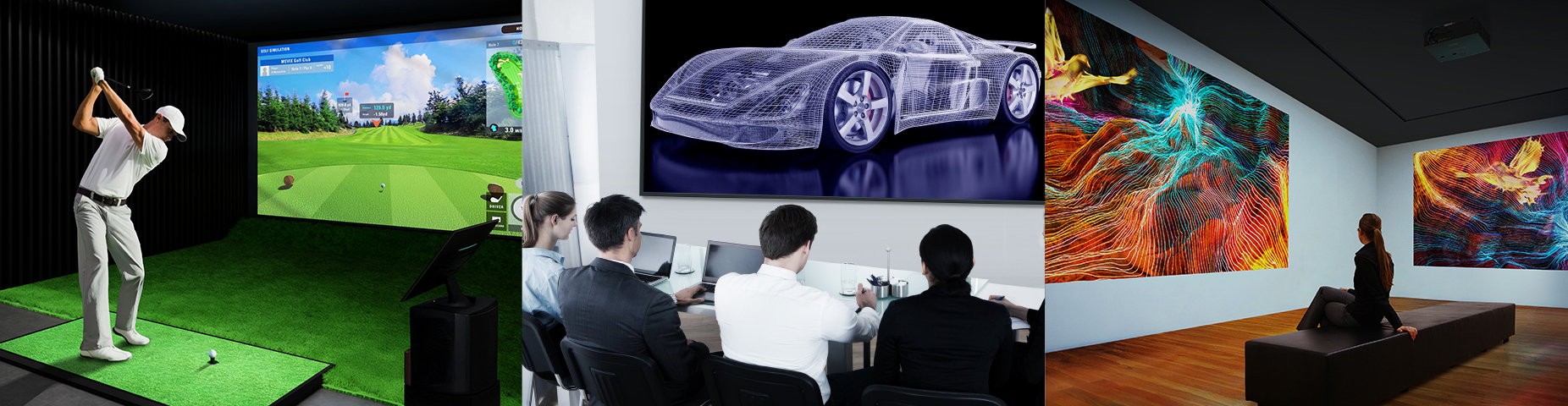
The VMQ85 Series brings smooth, high-resolution projection within reach of more diverse applications, delivering Panasonic’s first
4K LCD visuals from the smallest and lightest platform in its class. Quad Pixel Drive 2-axis pixel-shifting technology and high brightness reveal crisp detail in well-lit spaces—from offices and classrooms to museums and sports simulators. Flexible installation, screen adjustment, and integration simplify setup, while efficient design streamlines daily operation.
Note: As of June 2026, based on internal research, the PT-VMQ85 is the smallest and lightest 4K LCD projector with over 8,000 lm, and the PT-VMQ75 is the smallest and lightest with over 7,300 lm. Displayed resolution 4K (3840 x 2400 pixels) with Quad Pixel Drive [ON].
Bright, High-Contrast Detail in Any Space
Quad Pixel Drive 2-Axis Pixel-Shifting Technology
Introduced for the first time on an LCD projector, Quad Pixel Drive enhances image precision by shifting pixels in both vertical and horizontal directions, increasing on-screen pixel density beyond conventional 1-axis systems. High-speed processing minimizes visible structure and gridding for smooth, detailed reproduction, ideal for technical drawings, digital art, museum displays, and XR simulation.
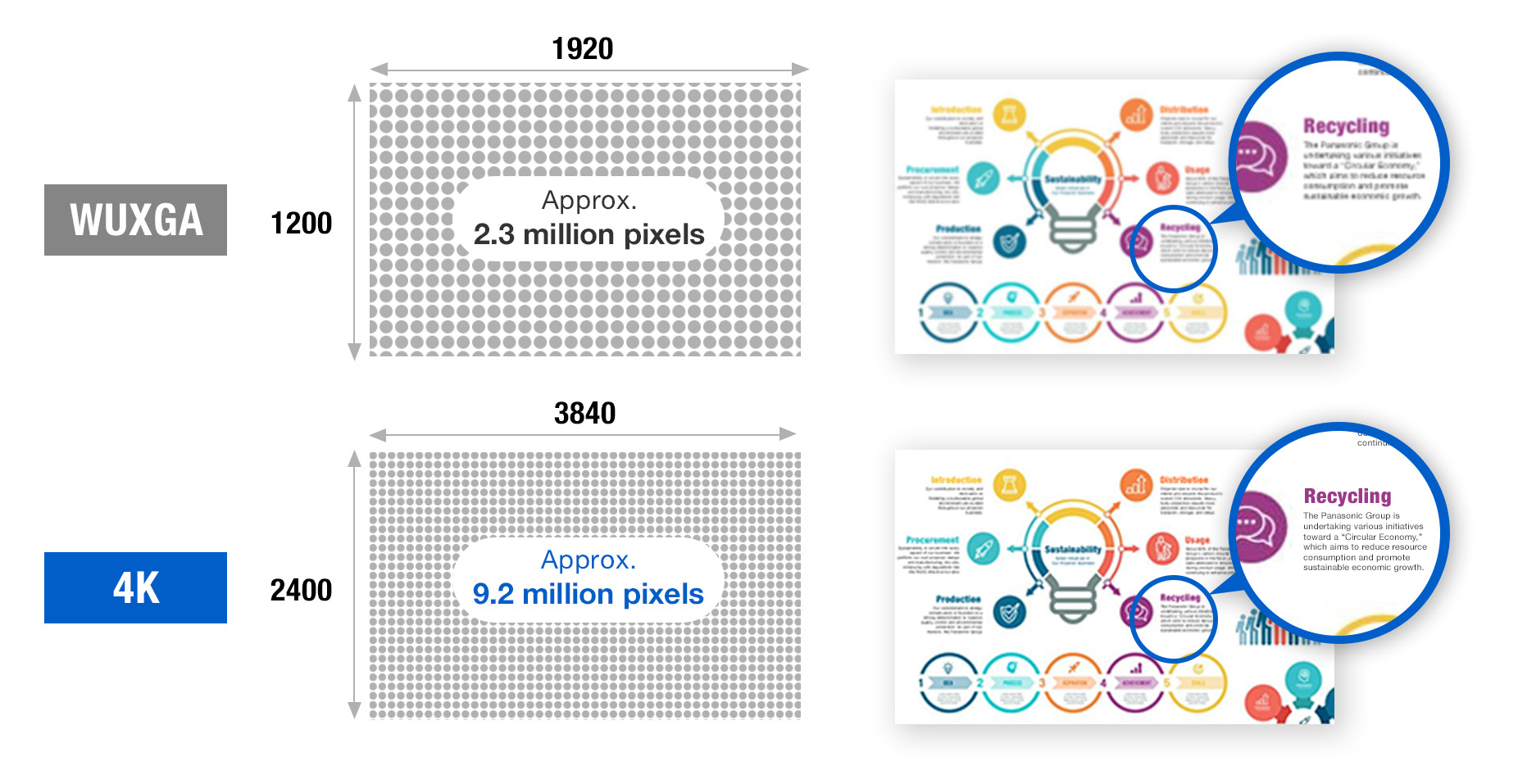
Note: Displayed resolution 4K (3840 x 2400 pixels) with Quad Pixel Drive [ON].
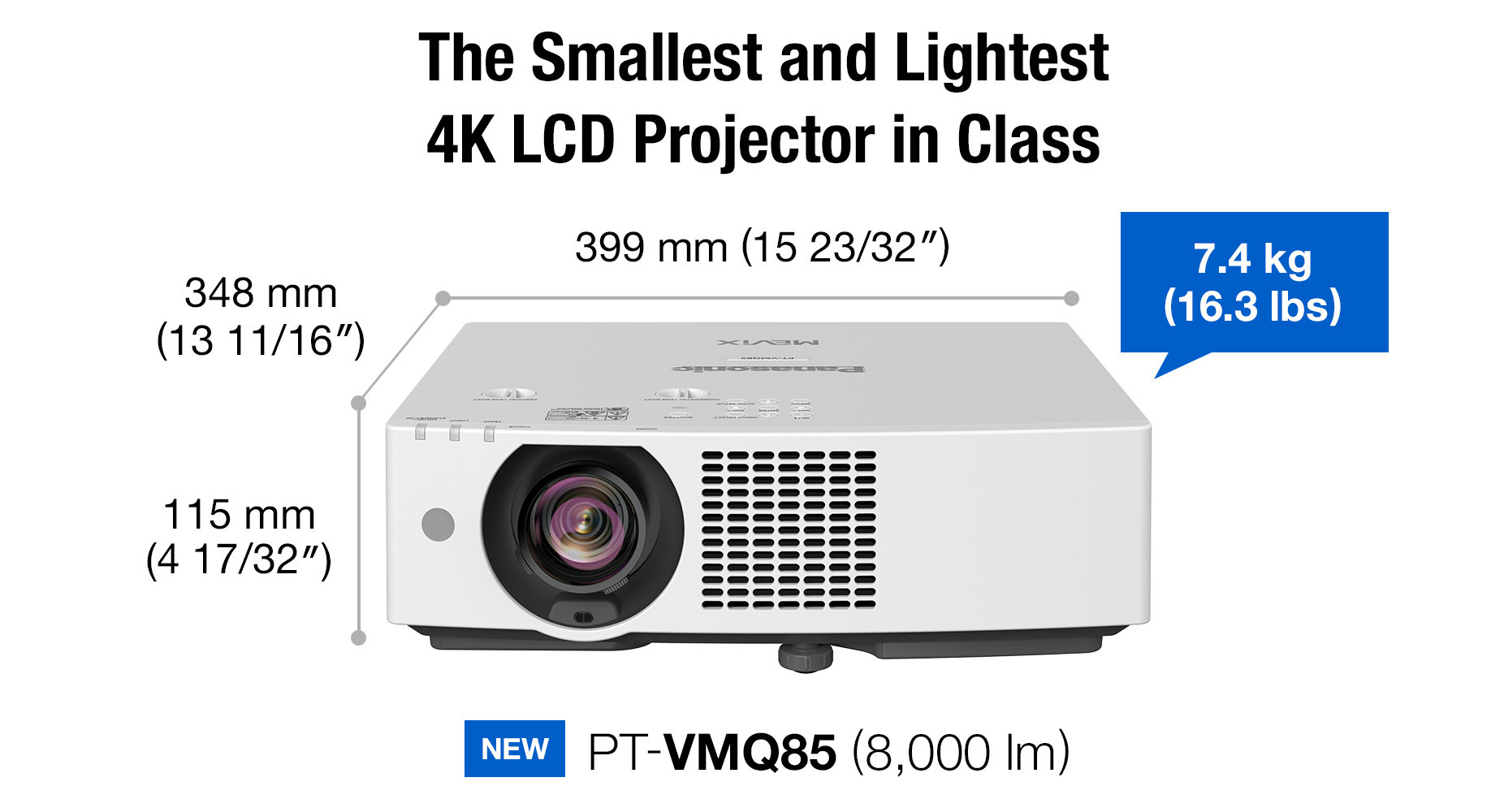
Up to 8,000 lm from a Compact Footprint
The VMQ85 Series delivers up to 8,000 lm from a compact, lightweight design, producing clear, vibrant visuals in well-lit spaces. Easy to carry and install, the projector supports efficient single-person setup and brings high-impact visuals to areas with limited installation space.
Note: Brightness measured when [PICTURE MODE] is set to [DYNAMIC], [LIGHT POWER] is set to [NORMAL], [DAYLIGHT VIEW] is set to [OFF], and [AUTO POWER SAVE] is set to [OFF]. Measurement, measuring conditions, and notation method comply with ISO/IEC 21118: 2020 international standards. Value is the average of all products
when shipped. As of June 2026, based on internal research, the PT-VMQ85 is the smallest and lightest 4K LCD projector with over 8,000 lm, and the PT-VMQ75 is the smallest and lightest with over 7,300 lm. Displayed resolution 4K (3840 x 2400 pixels) with Quad Pixel Drive [ON]. Dimensions are with feet retracted, excluding protruding parts.
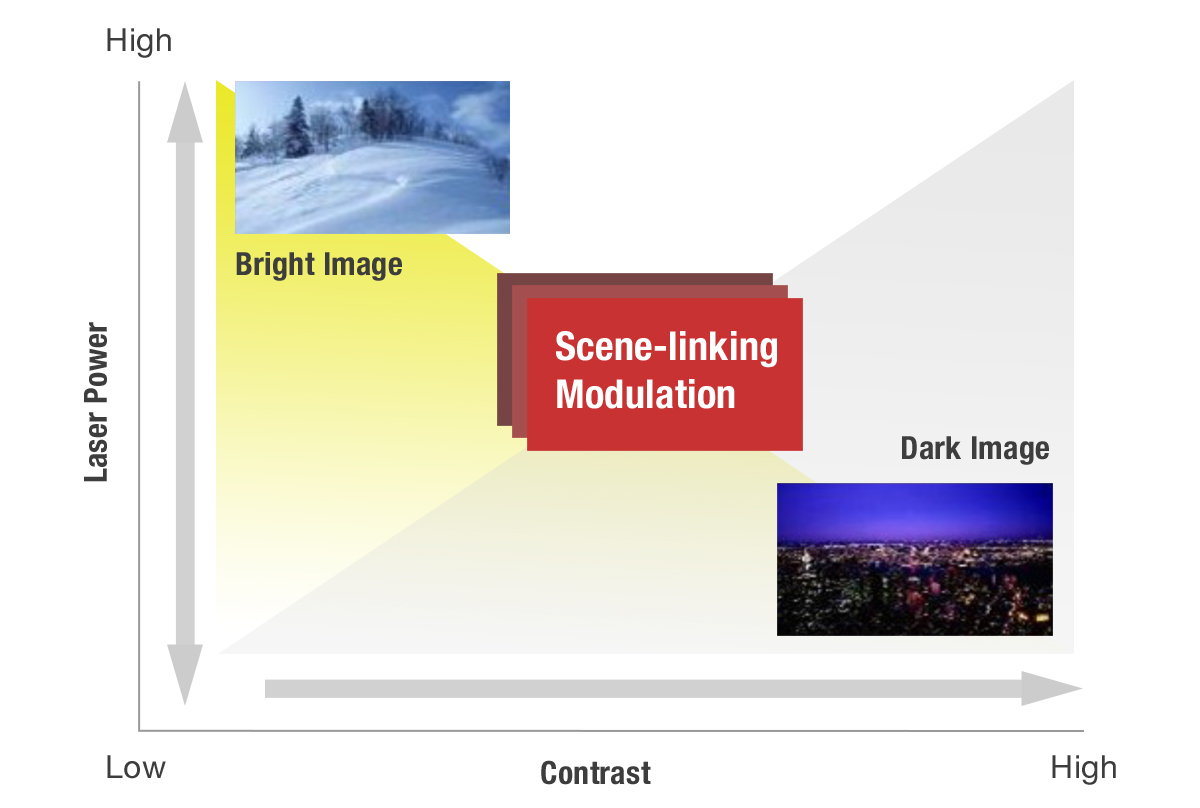
High 5,000,000:1 Dynamic Contrast
Scene-linking modulation analyzes content frame by frame to precisely adjust light output, delivering optimal contrast in every scene. It accurately reproduces rapidly changing bright and dark content while operating more efficiently than conventional systems, with optimization to suit content or ambient lighting. Enjoy enhanced detail in shadows, deeper blacks, brighter whites, and more natural skin tones for a stronger sense of depth and realism.
Note: Contrast ratio measured Full On/Full Off, when [PICTURE MODE] is set to [DYNAMIC] and [DYNAMIC CONTRAST] is set to [1]. Measurement, measuring conditions, and method of notation all comply with ISO/IEC 21118: 2020 international standards. Value is the average of all products when shipped.
Clearer Visuals in Bright Spaces
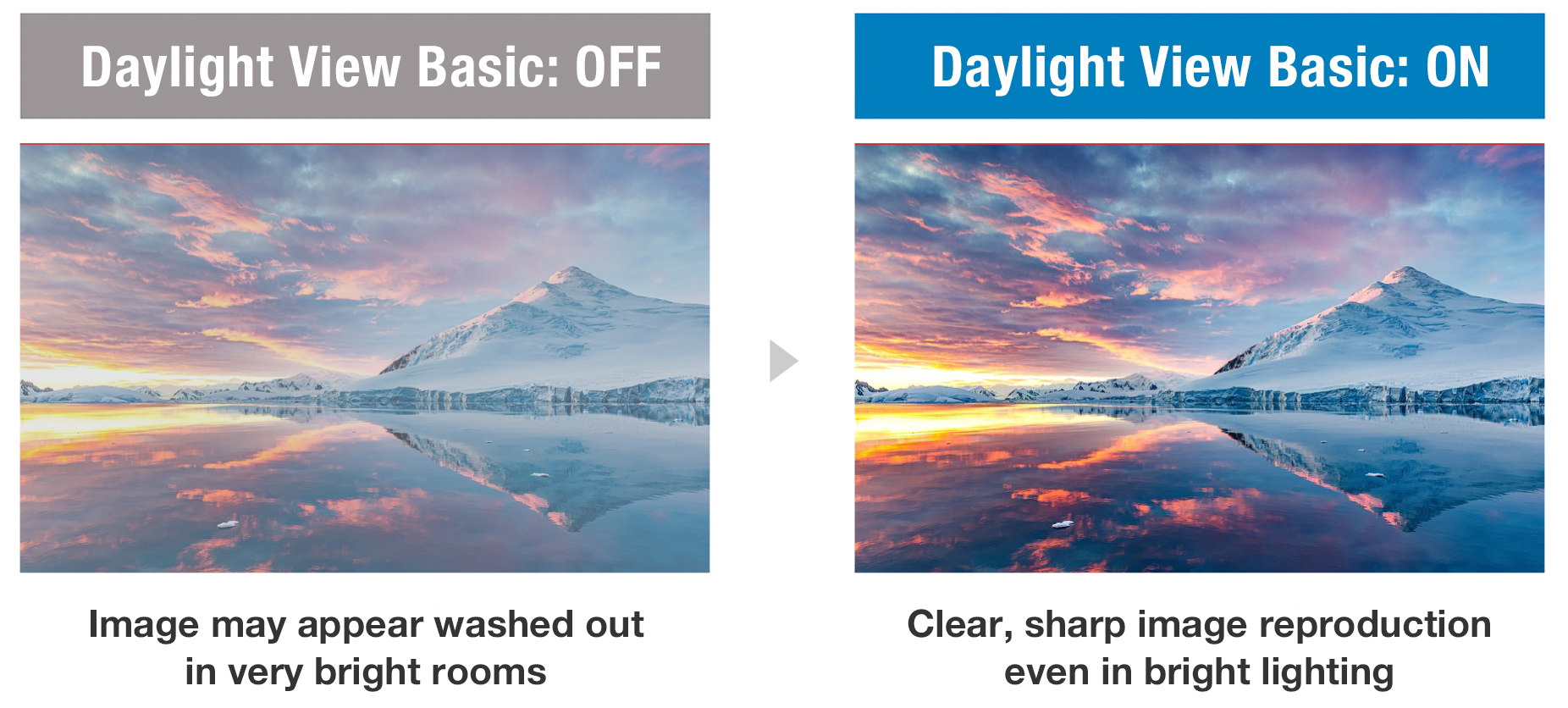
Daylight View Basic uses a sensor to measure ambient light levels in your room and adjusts sharpness, halftone color, contrast, and brightness to optimize image visibility regardless of the room lighting. The result is a clearer, more detailed image, even in challenging conditions.
Vivid Green Mode for Sports Simulation
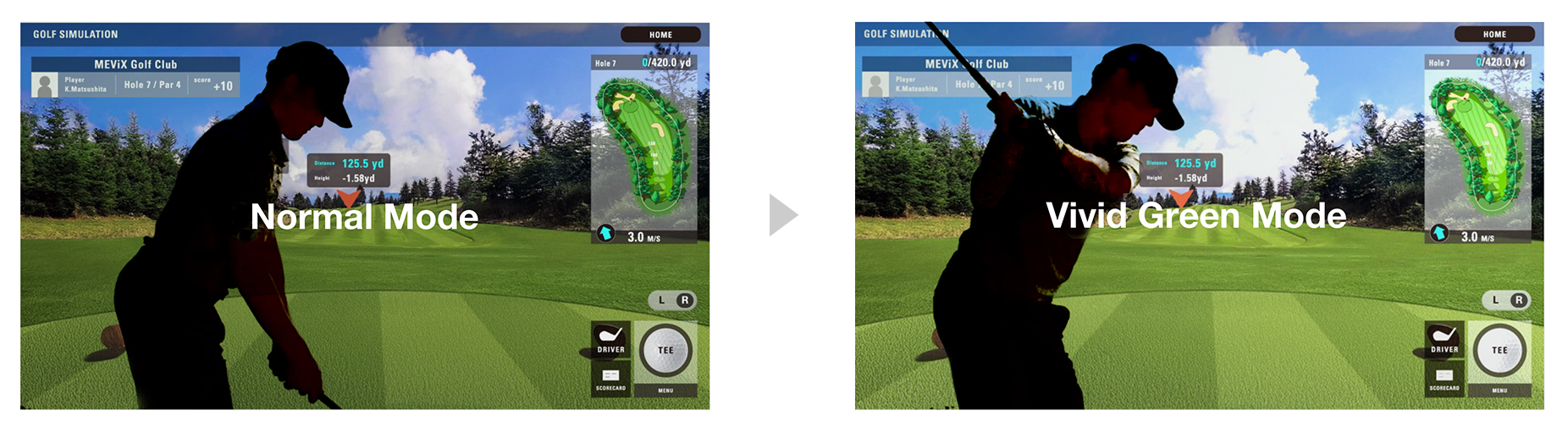
Vivid Green Mode enhances green tones for brighter, more natural-looking images—ideal for golf and other sports simulations. By adjusting signal gain and optimizing color balance, this mode delivers deeper greens and brighter midtones for a more engaging viewing experience.
Supports Widescreen 21:9 Video
Display widescreen content, such as 21:9 video conferencing layouts, at its original aspect ratio. The faces of remote participants can be aligned at eye level with in-room attendees, improving communication and engagement during meetings or classes.
Easy to Handle with Flexible Installation
Flexibility to Fit Your Space
Maximize screen area in almost any space, with 100-inch image projection from just 2.35 m (7.71 ft)—ideal for smaller sized rooms. A 1.6x optical zoom and wide lens shift make it easy to avoid ceiling obstructions or align the image from an existing mount, while Digital Zoom Extender enables reuse of ceiling mounts when positioned beyond the optical throw distance.
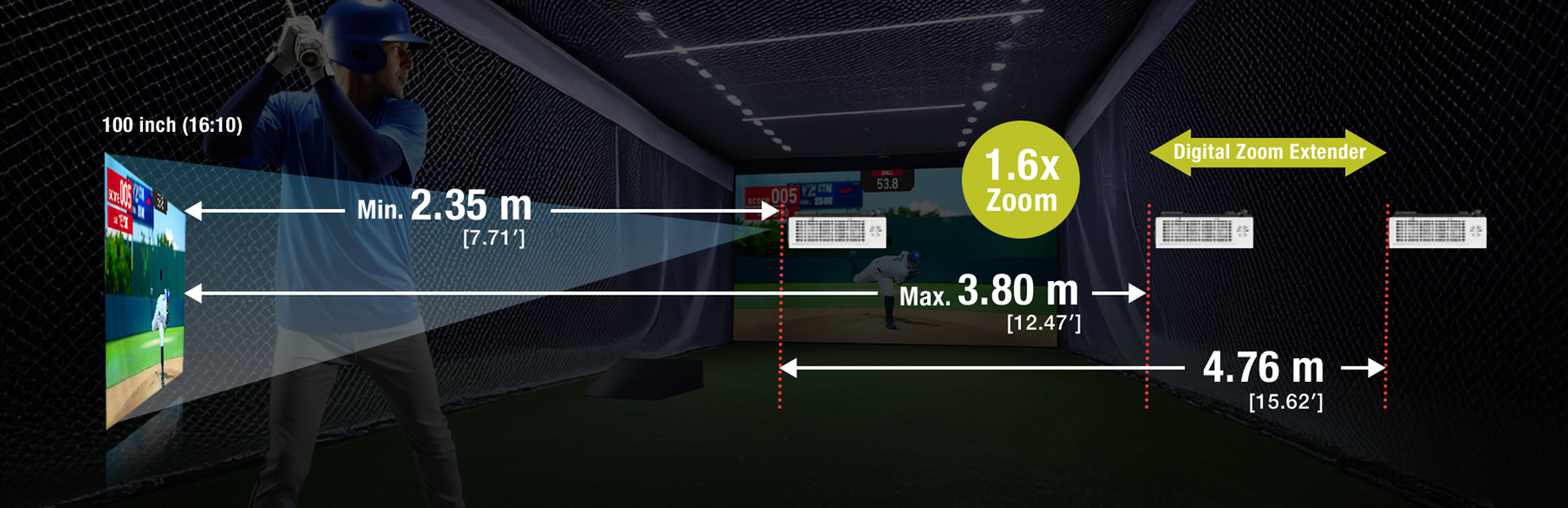
Note: Image is not to scale. Resolution decreases when using Digital Zoom Extender and Digital Image Shift. When using Digital Zoom Extender, the image reduction rate can be adjusted up to 80%. If set below 100%, the image position can be shifted vertically or horizontally using Digital Image Shift. Some screen correction functions are unavailable when using this function, and the range of corner adjustment is limited. Using the same projector mount may not be possible in every situation.
Optimized for Golf Simulation
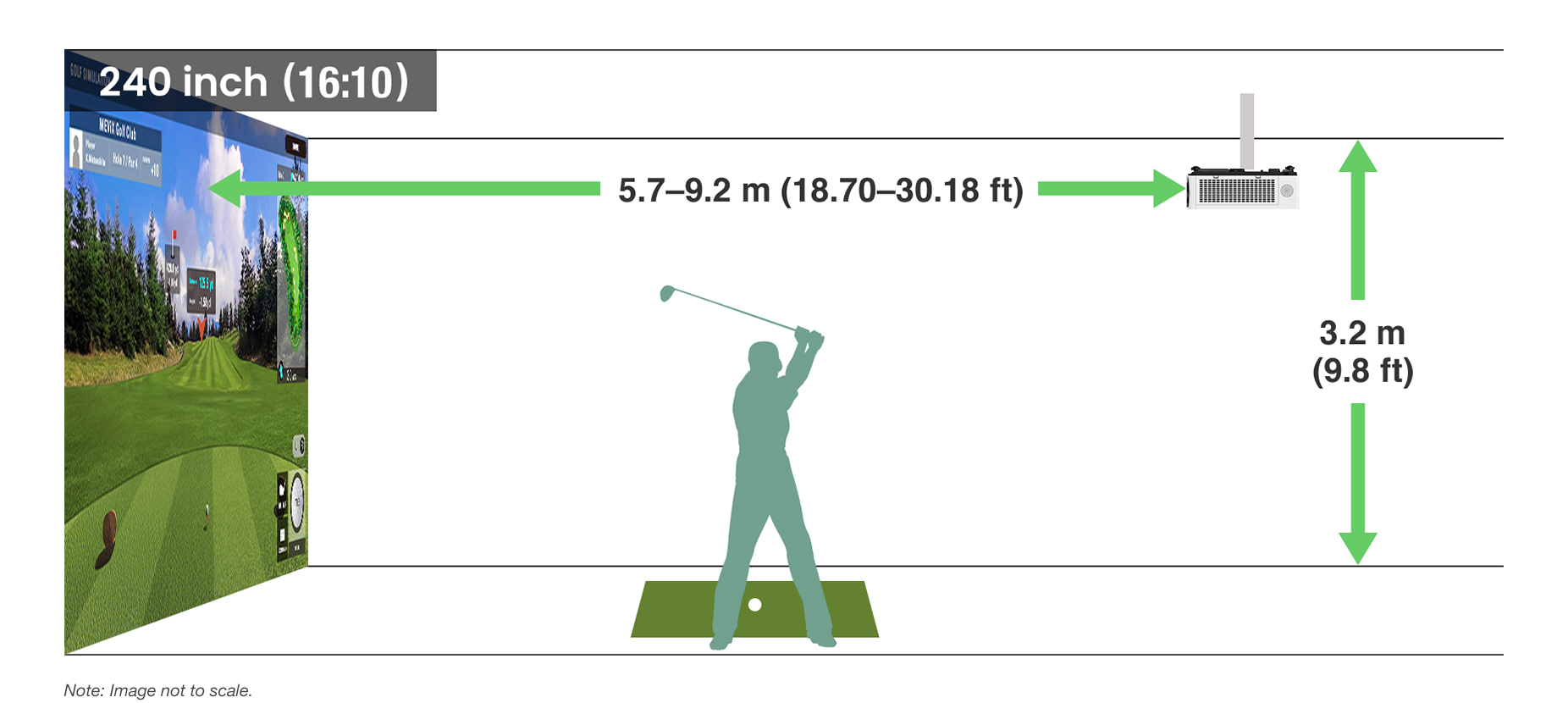
Designed with golf simulation in mind, the series supports screen sizes up to 300 inches and can produce a 240-inch image from just
5.7 m (18.70 ft)—ideal for typical sim bays with 3.2 m (9.8 ft) ceilings. A range of mounting options, along with a single-cable HDBaseT™-based
4K DIGITAL LINK connection, streamlines installation, integration, and control in large venues.
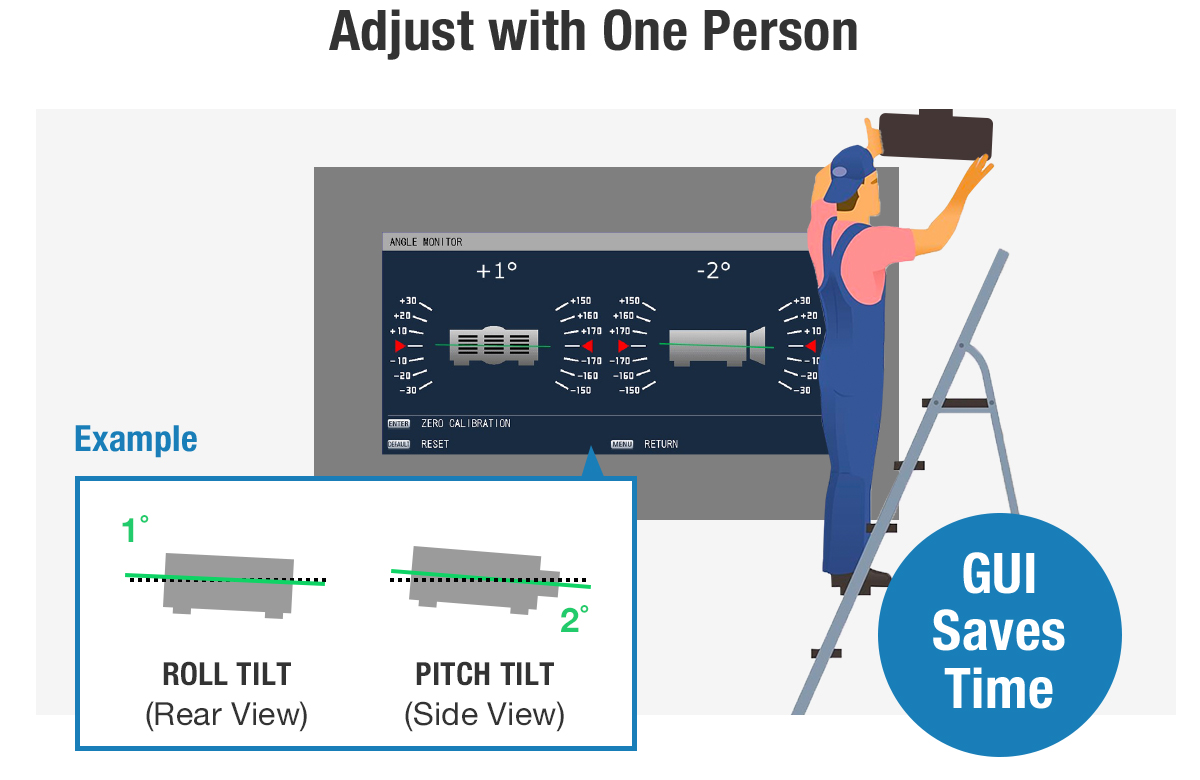
Resource-Friendly Adjustment with Angle Monitor
A built-in sensor detects changes in the projector’s pitch and roll angles and graphically displays them in the projector’s OSD settings menu. Technicians can view the info on screen and adjust the projection angle without needing assistance.
Note: The displayed values are based on the results of angle sensor detection and may differ from the actual projection angle. They are for reference only, and accuracy is not guaranteed.
Enhanced Screen Adjustment Suite
The projector’s Screen Adjustment suite features an updated graphical user interface (GUI) offering more intuitive operation. Designed to simplify setup in a wide range of spaces, it enables precise adjustments via remote control without needing a PC.
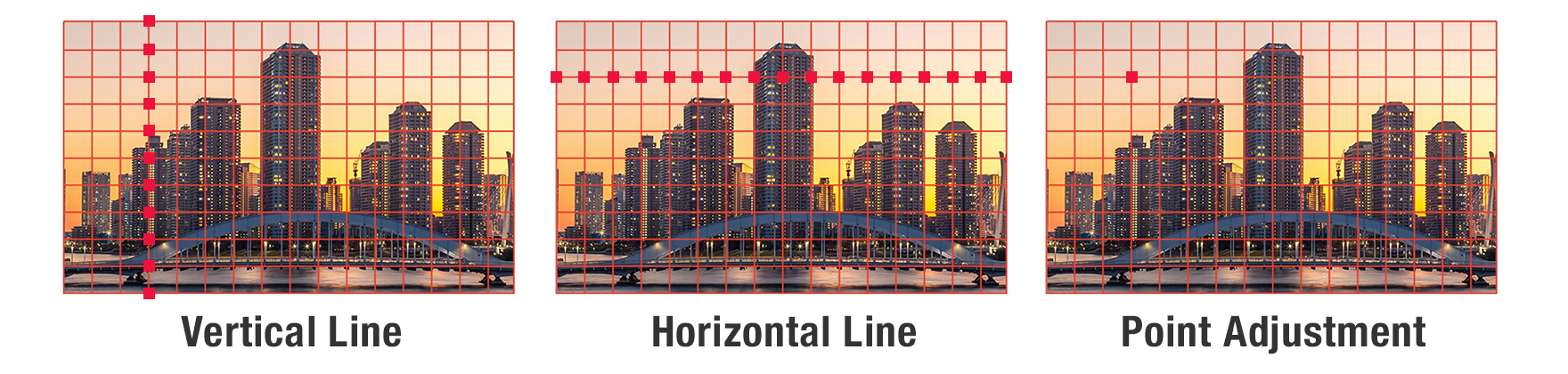
Line and Point Adjustment via Grid Function
A grid function enables correction of minor distortion by adjusting horizontal or vertical lines, or any specific point on a grid from 2 x 2 up to 17 x 13. Correction is easily performed via remote control.
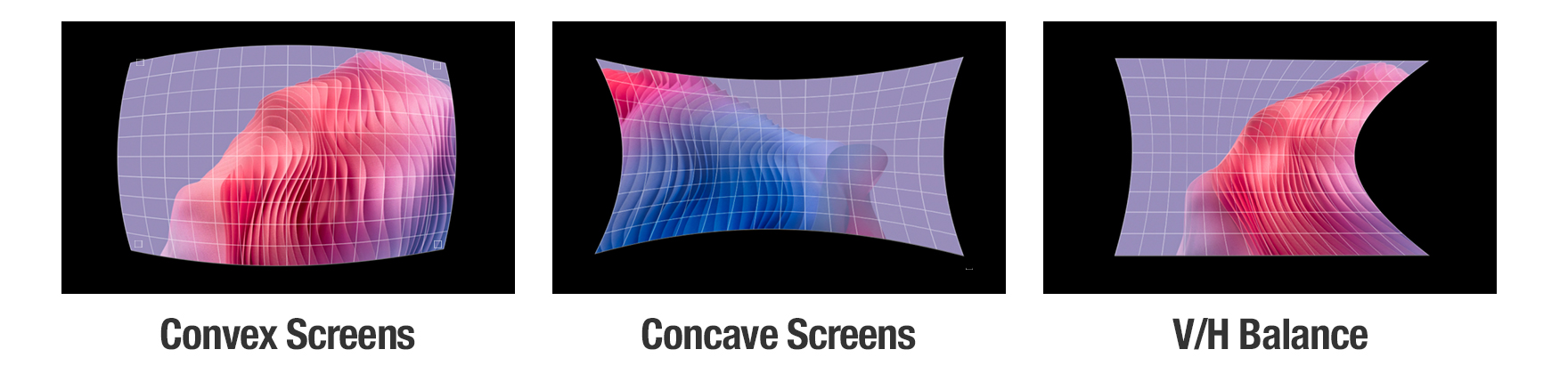
Improved Adjustment for Curved Screens
In addition to Horizontal and Vertical Arc adjustment, new V/H Balance controls allow each side of the image to be fine-tuned independently for greater adjustment flexibility. This enables more precise image alignment on curved screens and helps simplify setup in applications such as sports simulators, museum exhibits, and corporate displays.
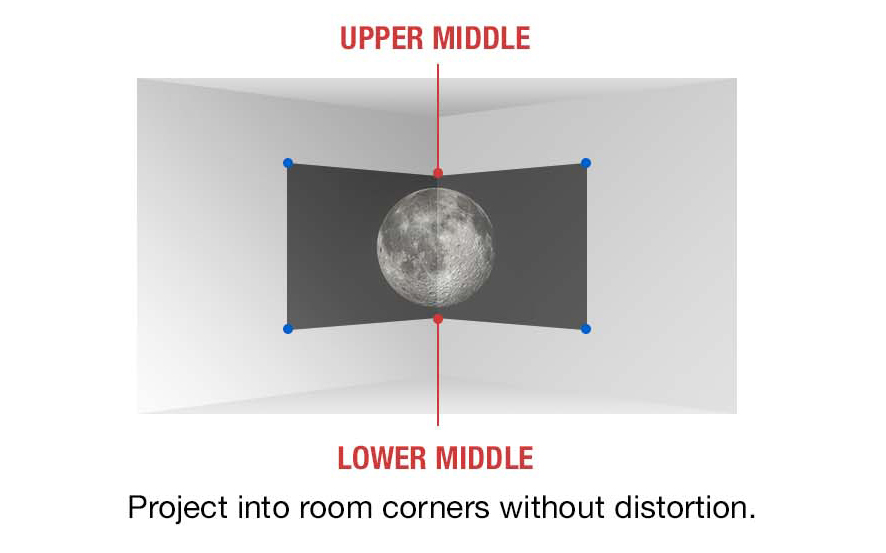
6-Point Screen Adjustment System
For corner-based or column projections, the 6-Point Screen Adjustment system enables fine-tuned control over image geometry. It’s ideal for maximizing screen use in compact meeting spaces or creating striking visual installations in galleries and showrooms.
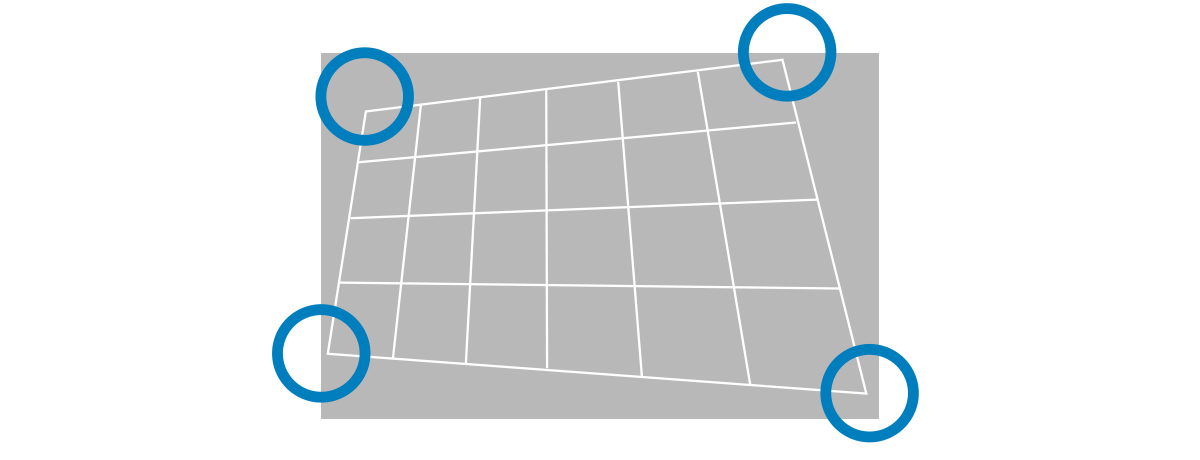
V/H Keystone Correction with 4-Corner Adjustment
4-Corner Adjustment lets users independently control each image corner when correcting trapezoidal distortion. Settings can be saved and reapplied, streamlining setup across multiple rooms or sessions.
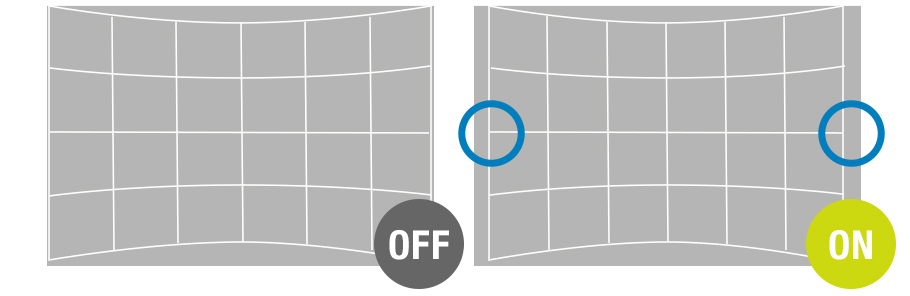
Maintain Aspect Ratio for Natural Scaling
Maintain Aspect Ratio preserves the image’s proportions during adjustment, preventing warping or stretching. It ensures content looks natural while still allowing for edge-to-edge alignment, providing a clean, professional finish in any space.
Single-Cable 4K DIGITAL LINK Solution

4K DIGITAL LINK, based on HDBaseT™, transmits video, audio, and control signals over a single
CAT 5e cable, simplifying installation in schools, offices, and entertainment spaces.
Note: YPBPR 4:2:0 format only for 4K/60p signals input via DIGITAL LINK.
Supports Next-Generation Control Protocols
Dedicated LAN terminal and 4K DIGITAL LINK connections support the latest protocols, including IPv6, AMX® DD, PJLink™ (Class 2), Crestron Connected® V2, Crestron® XiO Cloud, and Extron XTP®. The projector also includes an emulation function to ensure compatibility with legacy management software.
Note: The optional AJ-WM50 Series Wireless Module does not support IPv6.
Data Cloning Function via LAN or USB Memory Devices
It can be time-consuming to adjust the same settings on each projector in your fleet. To expedite this task, the VMQ85 Series features a data cloning function that allows main projector settings, including saved adjustment data, to be copied to sub-projectors via LAN or USB device.
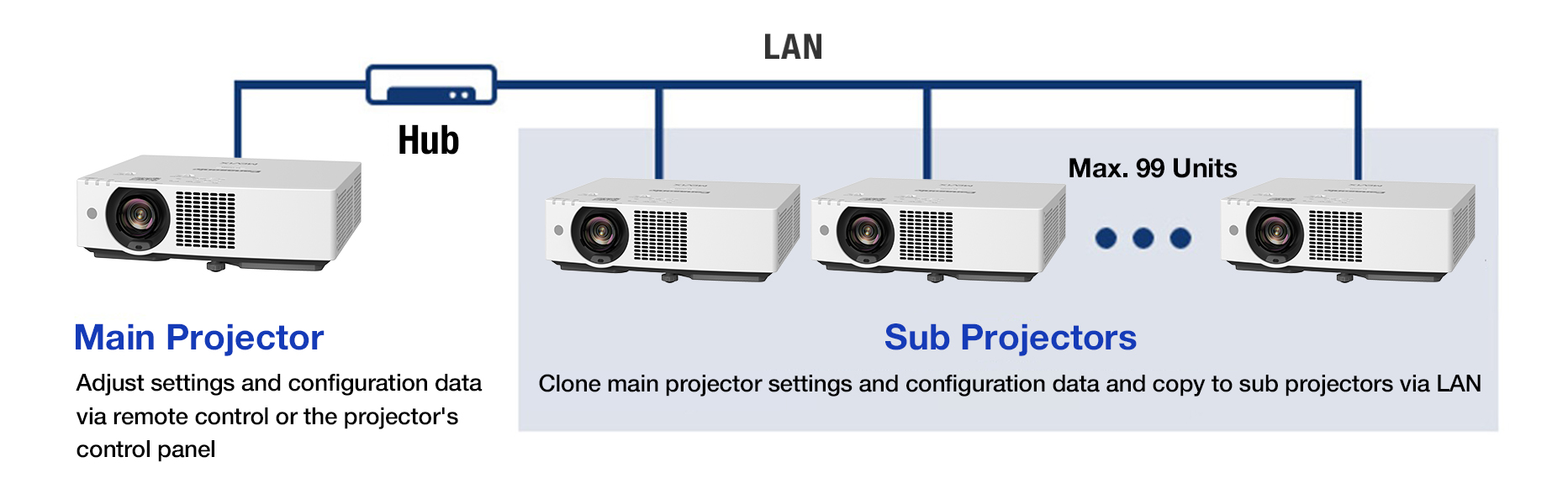
Note: Supported among identical models only. Excludes passwords, projector name/ID, time, date, time zone, and network settings.
CEC Command-Compatible HDMI™ Inputs and HDMI™ Output
CEC command-compatible HDMI™ inputs support linked power and playback control with compatible source devices, simplifying day-to-day operation. Auto Input Search automatically selects active input signals, reducing manual switching. An HDMI™ output is included to simplify signal distribution for multi-display installations and integrated AV environments.
Note: HDMI™ output is incompatible with CEC. Depending on the connected CEC command-compatible device, the link control may not operate normally.
Web API Support
Web API enables seamless integration with proprietary and third-party management and automation systems, supporting centralized projector control, configuration, status monitoring, and automated workflows across diverse AV environments. For more information, visit the What Is Web API? webpage here.
-

- Control
- Power on/standby, change test patterns, adjust lens shift, focus, and zoom
-

- Setting
- Configure operating mode, set clock, perform firmware updates
-

- Status
- View error reports, temperature readings, and fan rotation speeds
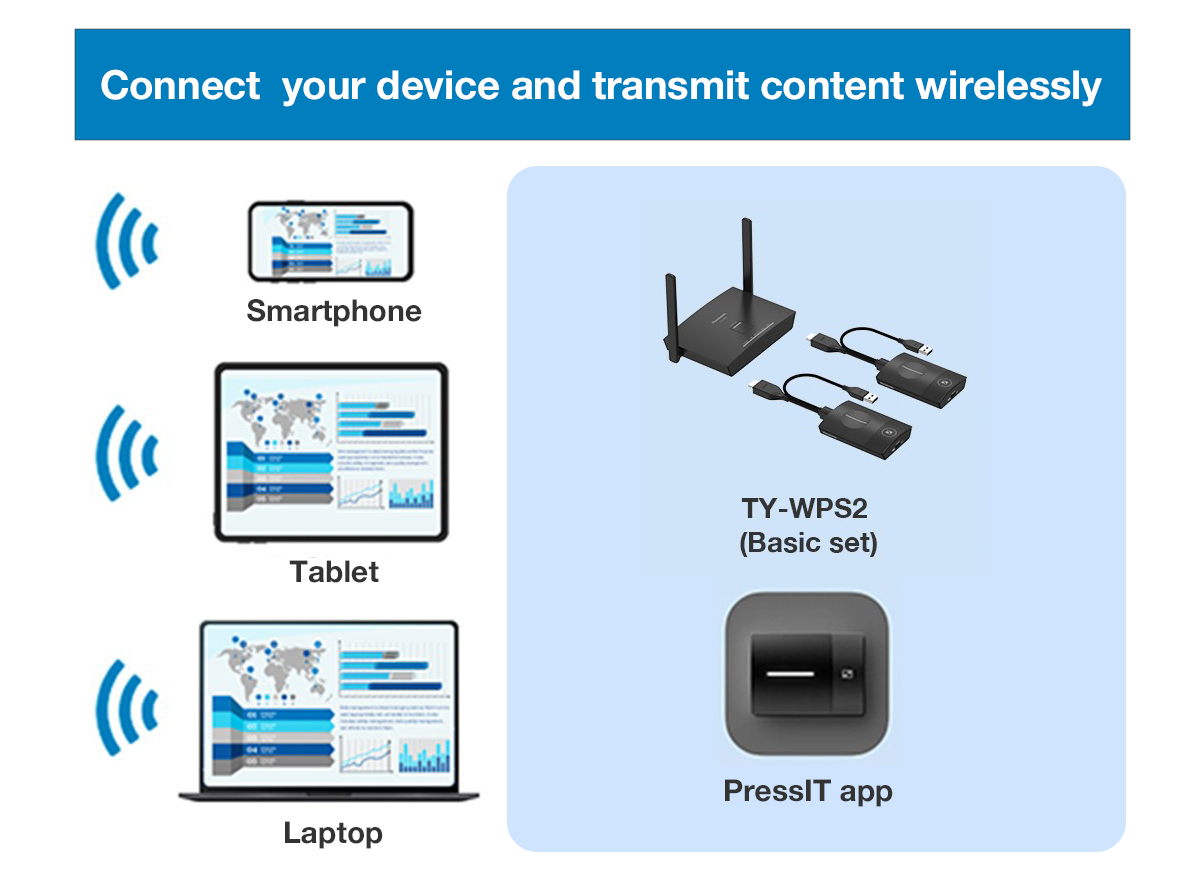
Works with Wireless Presentation System PressIT
Share your device screen wirelessly and switch presenters freely. PressIT, Panasonic’s optional Wireless Presentation System, supports screen-sharing at the press of a button. PressIT comprises transmitters connected to your devices and a receiver connected to the projector. Learn more about PressIT here or visit our Wireless Solutions webpage.
Note: Wireless Presentation System PressIT is sold separately. Availability may vary by country or region. USB Type-C terminal of the video output device requires support for DisplayPort™ ALT Mode (video output function) and power supply function (5 V/0.9 A). PressIT app (available free from the App Store or the Google Play store) is required when using Android™ or iOS/iPadOS devices. For more details, please refer to the operating manual.
Lens Block Detection Protects Your Investment
An integrated infrared sensor detects obstructions in front of the lens and automatically reduces light output to prevent overheating and damage to the lens. A warning message is displayed on screen, and normal operation resumes once the obstruction is removed.

Works with Multi Monitoring & Control Software
Multi Monitoring & Control Software manages up to 2,048 display devices from a PC over LAN. The software facilitates status monitoring, device control, playlist delivery, playback scheduling, and system map visualization. For more information, please visit our software information webpage.
Energy-Efficient,
Eco-Conscious Design
Brighter, Yet More Efficient
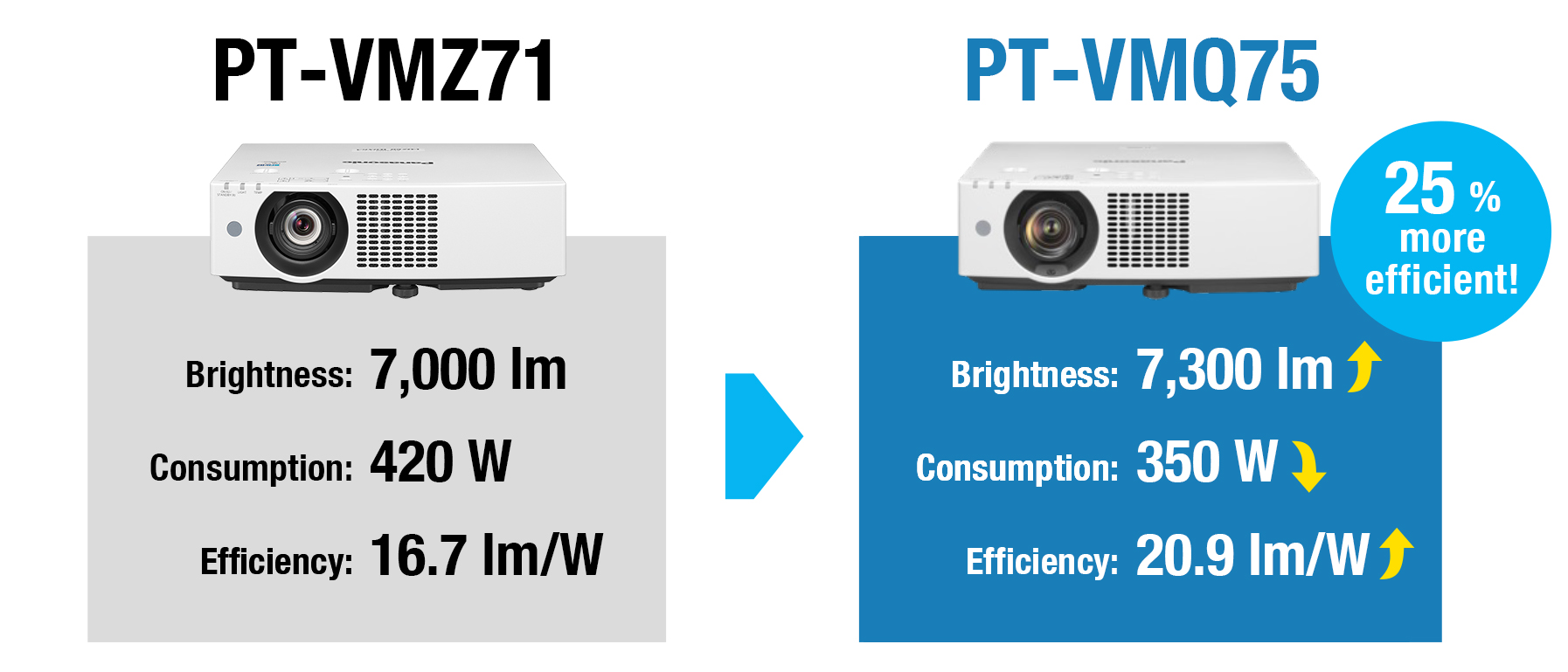
The VMQ85 Series delivers higher brightness with improved energy efficiency over the previous VMZ71 Series, with the PT-VMQ75 achieving up to 25% greater luminous efficiency (20.9 lm/W). Reduce consumption while lowering the carbon footprint across your projector fleet.
Note: Measured when [PICTURE MODE] is set to [DYNAMIC] and [LIGHT POWER] is set to [NORMAL]. Measurement, measuring conditions, and notation method comply with ISO/IEC 21118: 2020 international standards. Value is the average of all products when shipped.
Eco Initiatives to Protect the Earth
Panasonic is committed to reducing environmental impact through initiatives that conserve resources and cut waste, including the use of recycled resins (up to 59% for the VMQ85 Series) and easily recyclable cardboard packaging. Scaled across our product range, these efforts significantly reduce reliance on virgin materials while minimizing waste. By choosing Panasonic, you’re supporting more sustainable manufacturing and a cleaner, greener future.
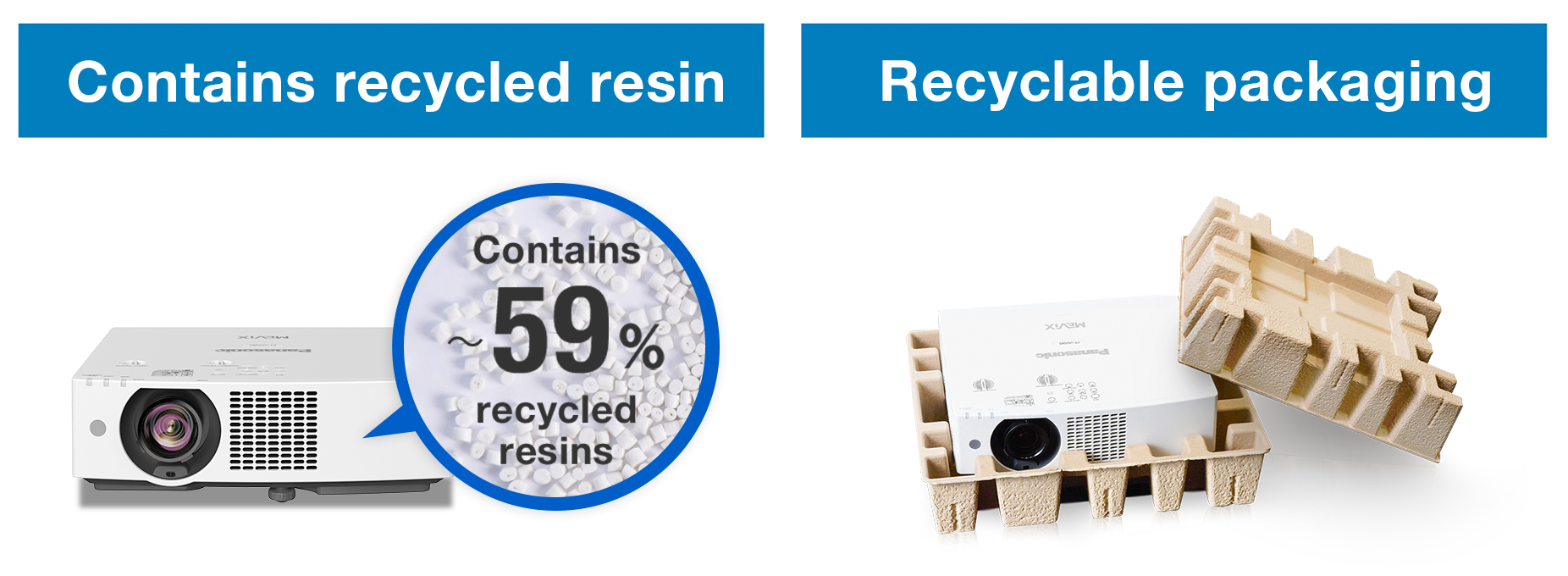
Note: By total weight of plastic parts in the projector main unit. Excludes projection lenses, printed circuit boards, labels, cables, connectors, electronic components, optical components,
ESD components, EMI component adhesives, and coatings.
Image Detection: Smart Power Savings
Image Detection reduces power consumption during inactivity. If no change is detected in the projected image for a set time, the projector can automatically dim the light output by 50% or turn off the light source. The timer is adjustable, and brightness returns when activity resumes, reducing energy waste without interrupting the experience.
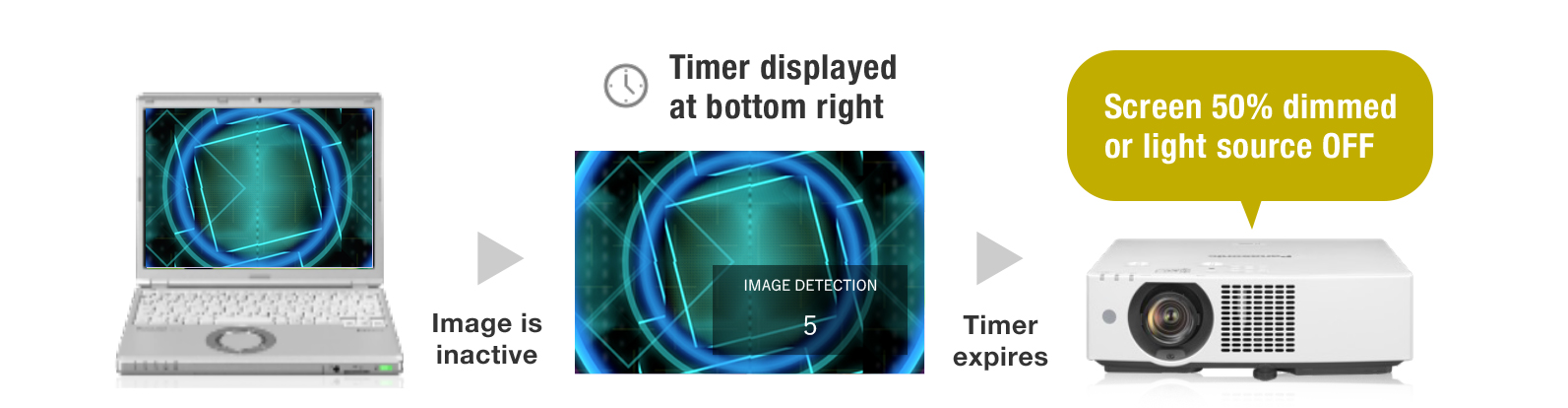
Note: If the projector enters standby while in Image Detection power-saving mode, resumption time may vary depending on standby settings and input source. Settings cannot be made when [PICTURE] menu → [DAYLIGHT VIEW] is set to [AUTO], [DYNAMIC CONTRAST] is set to anything other than [OFF], [ECO MANAGEMENT] → [AUTO POWER SAVE] is set to [OFF], [ECO MANAGEMENT] → [LIGHT POWER] is set to anything other than [NORMAL], a [TEST PATTERN] is displayed, or there is no signal. Image Detection function is supported when the input signal is transmitted via HDMI™ terminal.
Auto Power On: Save Power, Streamline Operation
The projector can automatically switch on from standby and begin projection when an input signal is detected. This allows presenters to turn off the unit between sessions without worrying about resumption delays, reducing unnecessary energy consumption between sessions.
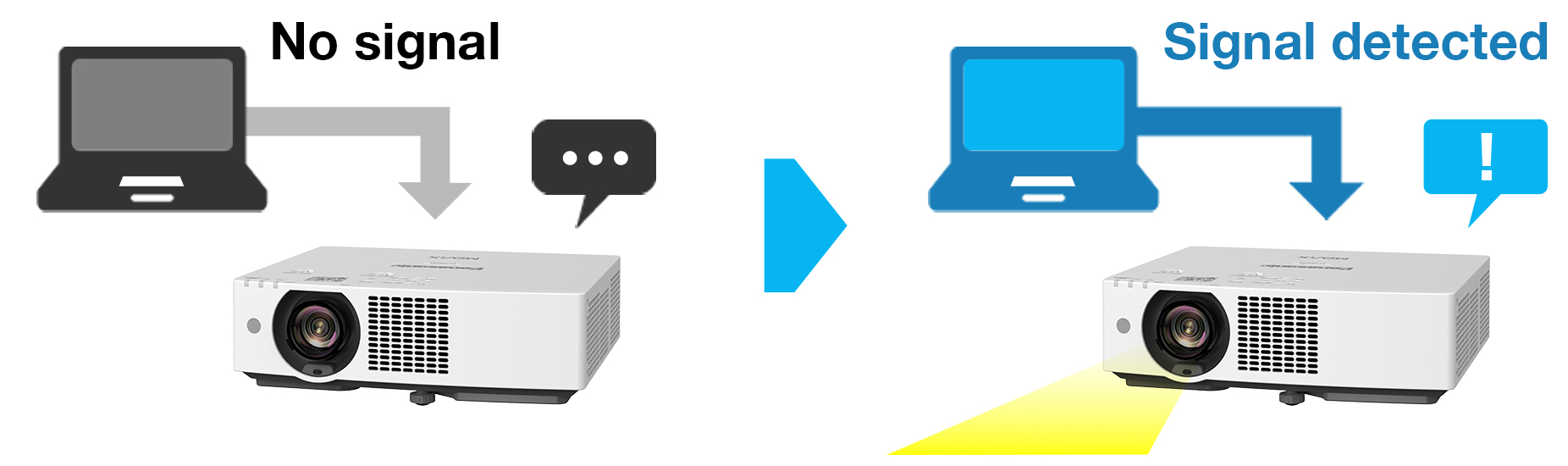
Note: Settings cannot be made when [STANDBY MODE] is set to [ECO/NETWORK] or when [IN STANDBY MODE] is set to [ON] in the [AUDIO SETTINGS] menu. Auto Power On is supported when the input signal is transmitted via HDMI™ terminal.
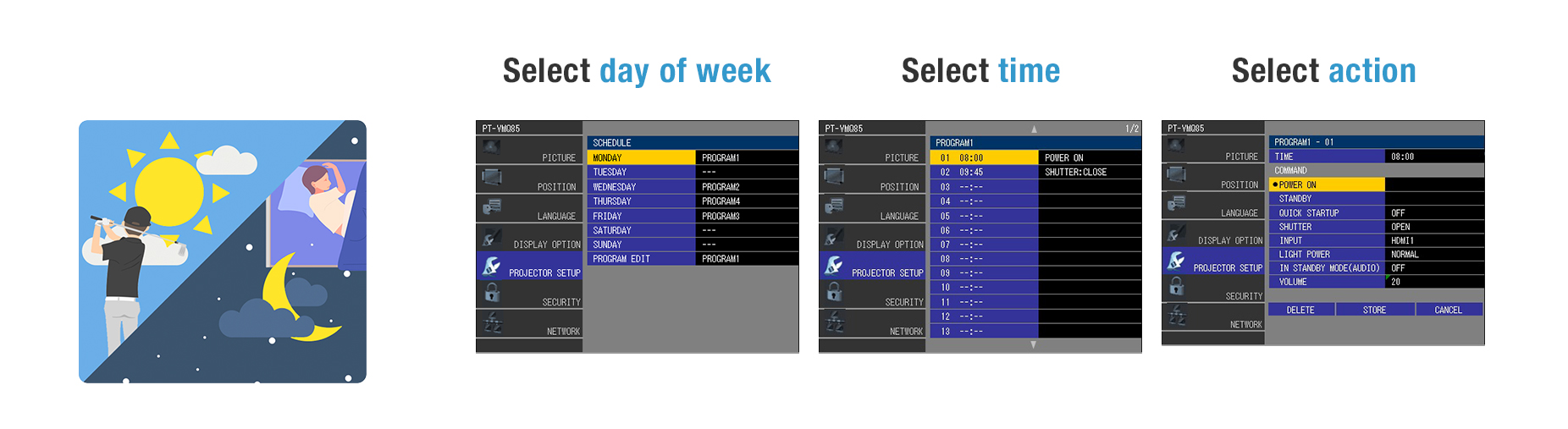
Easy Automation with Built-In Scheduling
Program the projector to perform automated actions, including power on/off, shutter activation, and input selection, at specific times throughout the week. This functionality streamlines operations, reduces manual labor, and optimizes resource management.
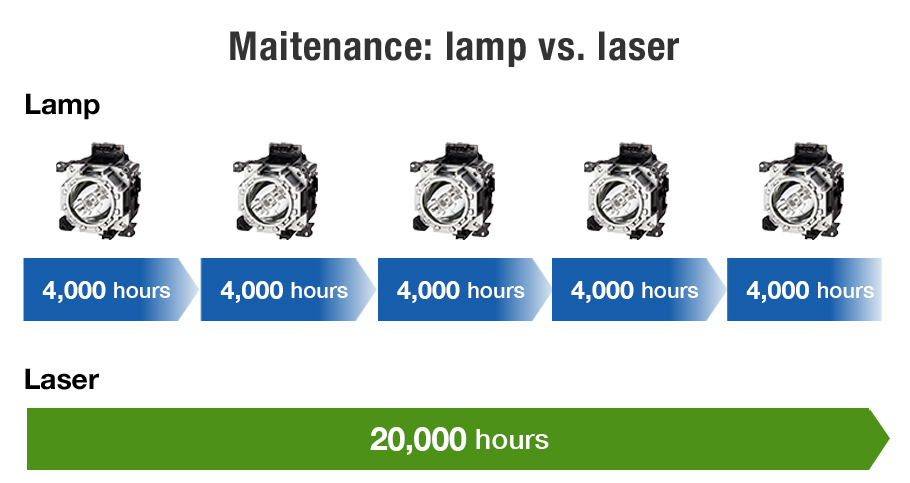
No Light-Source Maintenance for 20,000 Hours
The VMQ85 Series offers more than consistent, long-lasting picture quality. Its laser light source is rated for 20,000 hours operation without maintenance, outperforming lamp projectors that can require several lamp replacements over the same period. This significantly reduces operating costs and eliminates mercury lamp disposal.
Note: The number of lamp replacements required depends on the user and usage conditions. At around 20,000 hours, the light output will have decreased to approximately 50 % of its original level ([PICTURE MODE]: [DYNAMIC], [DYNAMIC CONTRAST] set to [2], temperature 30 °C [86 °F], elevation 700 m [2,297 ft] with 0.15 mg/m3 of particulate matter). The estimated time until light output declines to 50 % varies depending on the environment.
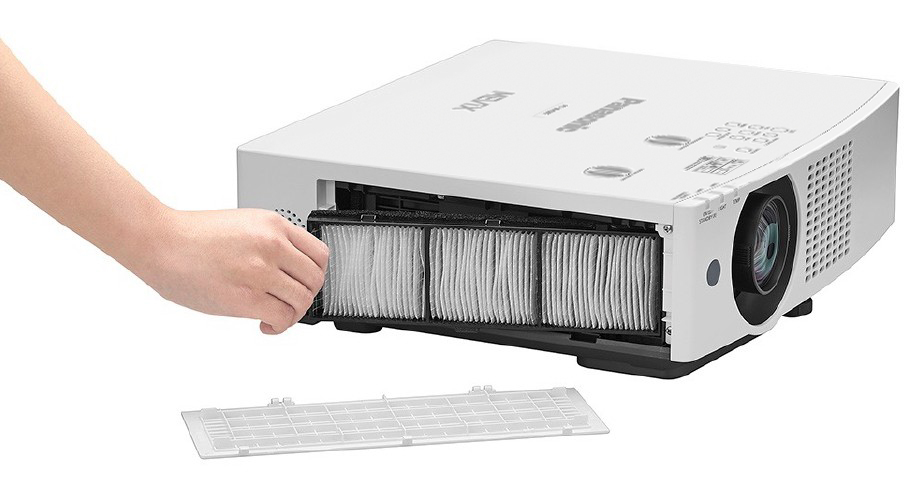
Long-Life ECO Filter Reduces Downtime
ECO Filter includes a Micro-Cut Filter that collects minute dust particles with an electrostatic effect, reducing maintenance and downtime. Filter replacement is recommended at about 20,000 hours when used in typical commercial environments. If it’s necessary to maintain the filter before then, it can be washed and reused, reducing cost and waste.
Note: PT-VMZ71 projector shown. Filter cleaning cycle: 20,000 hours (under dust conditions of 0.08 mg/m3), 10,000 hours (under dust conditions of 0.15 mg/m3). Filter can be washed and reused up to two times. When washing the filter with water, please follow the procedures listed in the operating instructions.
Other Features
- ・ Quick On/Quick Off Mode and Direct Power Off
- ・ Memory Viewer Light media player for still image files on USB devices
- ・ Audible feedback for ON/OFF via remote or panel controls
- ・ Auto Screen Rotation and Shutter Function
- ・ 10 W monaural speaker and Audio Standby passthrough mode
- ・ Free 360° installation
- ・ Startup Logo Function
- ・ Presentation Support System
- ・ DICOM Simulation Mode